Hetzner Cloud has become one of the most popular infrastructure providers for running Kubernetes in production. The combination of low pricing, NVMe storage, dedicated vCPU options, and European data centers makes it attractive for teams that want predictable costs without the complexity of hyperscaler billing.
But Hetzner does not offer a native managed Kubernetes service. That means you need to choose how to get Kubernetes running on Hetzner infrastructure. This guide covers every major approach, from fully manual setups to managed platforms, so you can pick the one that matches your team’s skills and operational appetite.
Why run Kubernetes on Hetzner?
Hetzner’s pricing is the most obvious draw. A dedicated 8-vCPU instance (CCX33) costs roughly a quarter of what comparable instances cost on AWS or GCP. When you factor in Hetzner’s 20 TB of free outbound traffic per server per month, the savings compound quickly for bandwidth-heavy workloads.
Beyond cost, Hetzner offers:
- NVMe SSD storage on all instance types
- Dedicated vCPU instances (CCX series) for consistent performance
- ARM instances (CAX series) with Ampere processors
- Six regions across three continents: Nuremberg, Falkenstein, Helsinki, Singapore, Ashburn, and Hillsboro
- Hourly billing with a monthly cap so you never pay more than the monthly rate
- GDPR-compliant European data centers in Germany and Finland
The trade-off is that Hetzner provides infrastructure primitives (servers, networks, load balancers, volumes), not platform services. There is no managed Kubernetes, no managed database, and no managed container registry in Hetzner’s portfolio. You either build these yourself or use a third-party platform.
Approaches to running Kubernetes on Hetzner
There are four main approaches, each with different trade-offs between control and operational effort.
1. Manual installation with kubeadm
The most hands-on approach. You provision Hetzner Cloud servers, install a Linux distribution, and use kubeadm to bootstrap a Kubernetes cluster.
What you manage: Everything. Control plane nodes, etcd, CNI plugin, CSI driver, load balancer integration, upgrades, certificate rotation, backup, and monitoring.
When it makes sense: Learning environments, or teams with deep Kubernetes expertise who want full control over every component.
Effort: High. Expect to spend several days on initial setup and ongoing time on maintenance. You will need to integrate the Hetzner Cloud Controller Manager and Hetzner CSI Driver manually.
2. k3s on Hetzner
K3s is a lightweight Kubernetes distribution that simplifies installation. It bundles the control plane components into a single binary and includes Traefik as an ingress controller and local-path-provisioner for storage.
Several community projects automate k3s deployment on Hetzner:
- kube-hetzner uses Terraform and cloud-init to provision k3s clusters with Hetzner Cloud Controller Manager and CSI driver pre-configured
- hetzner-k3s is a CLI tool that creates k3s clusters on Hetzner with a single command
What you manage: Cluster upgrades, node scaling, monitoring, backup, load balancer configuration, and certificate management. The initial setup is automated, but day-2 operations remain your responsibility.
When it makes sense: Small to mid-size clusters where you want a faster start than kubeadm but are comfortable managing infrastructure. Popular for home labs and development environments.
Effort: Medium. Initial setup takes minutes instead of hours, but you still own the operational lifecycle.
3. Cluster API with Hetzner provider
Cluster API (CAPI) is a Kubernetes project that uses declarative APIs to manage cluster lifecycle. The Hetzner provider for Cluster API lets you define clusters as Kubernetes resources and manage them with GitOps workflows.
What you manage: A management cluster running CAPI controllers, plus the lifecycle of workload clusters. CAPI handles provisioning and upgrades but you still manage the management cluster itself, monitoring, and networking.
When it makes sense: Platform teams building internal Kubernetes platforms who want standardized, declarative cluster management across multiple environments.
Effort: Medium-high. Requires understanding of CAPI concepts and operating a management cluster.
4. Managed Kubernetes platform
A managed platform like Cloudfleet handles the control plane, node provisioning, upgrades, networking, and load balancing. You deploy workloads; the platform manages everything else.
What you manage: Your applications and their Kubernetes manifests. The platform handles control plane operations, Kubernetes version upgrades, node scaling, load balancer provisioning, and certificate management.
When it makes sense: Teams that want to use Kubernetes on Hetzner without building and maintaining cluster infrastructure. Production workloads where uptime and automated operations matter more than full infrastructure control.
Effort: Low. Cluster creation takes under two minutes. Adding Hetzner as an infrastructure provider requires a single API token.
Comparison table
| kubeadm | k3s / kube-hetzner | Cluster API | Managed (Cloudfleet) | |
|---|---|---|---|---|
| Setup time | Hours-days | Minutes | Hours | Minutes |
| Control plane management | You | You | You (mgmt cluster) | Managed |
| Node auto-provisioning | No | No | Partial | Yes |
| Kubernetes upgrades | Manual | Manual | Declarative | Automated |
| Load balancer integration | Manual | Manual | Manual | Automated |
| Multi-cloud support | No | No | Yes (with providers) | Yes (native) |
| Monitoring included | No | No | No | Yes |
| Uptime SLA | None | None | None | 99.95% |
| Cost | Hetzner infra only | Hetzner infra only | Hetzner infra only | Hetzner infra + management fee |
| Best for | Learning | Small clusters / labs | Platform teams | Production workloads |

Hetzner Kubernetes with Cloudfleet: how it works
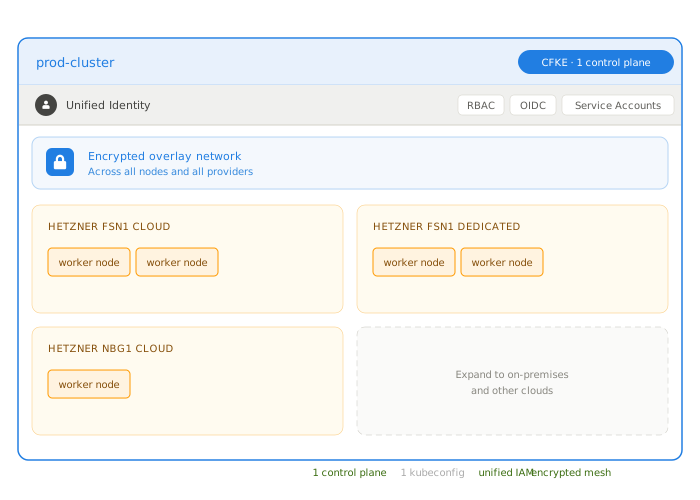
Cloudfleet provides a fully managed Kubernetes experience on Hetzner Cloud that eliminates the operational overhead of running your own cluster infrastructure. Here is what the setup looks like.
Step 1: Create a cluster
Sign up at console.cloudfleet.ai and create a new cluster. The control plane is provisioned in under two minutes. On the Pro tier, the control plane runs across multiple availability zones with a 99.95% uptime SLA. The Basic tier is free for clusters up to 24 vCPUs.
Step 2: Add Hetzner as a fleet
A fleet is a connection to a cloud provider account. To add Hetzner, you need a Hetzner Cloud API token with read and write permissions. Enter the token in the Cloudfleet console, and the platform handles everything else: creating networks, configuring the cloud controller manager, and setting up the CSI driver.
Step 3: Deploy workloads
Once the fleet is connected, deploy workloads using standard Kubernetes tools. Cloudfleet’s node auto-provisioner automatically selects the optimal Hetzner server type for your workload requirements and provisions nodes on demand. When workloads scale down, unused nodes are removed automatically.
You can control placement with standard Kubernetes labels:
nodeSelector:
  cfke.io/provider: hetzner
  cfke.io/region: europe
  topology.kubernetes.io/region: nbg1
What is included
- Node auto-provisioning: The platform selects optimal Hetzner instance types (CX, CPX, CCX, CAX series) based on workload resource requests
- Load balancer auto-provisioning: Hetzner Load Balancers are created and configured automatically when you create Kubernetes Services of type LoadBalancer
- Persistent volumes: The Hetzner CSI driver is pre-configured. Create PersistentVolumeClaims with the
hcloud-volumesstorage class and volumes are provisioned automatically - Multi-region clustering: Add fleets in multiple Hetzner regions (Nuremberg, Falkenstein, Helsinki, Singapore, Ashburn, Hillsboro) and run a single cluster that spans all of them
- Multi-cloud support: Combine Hetzner nodes with AWS, GCP, or on-premises infrastructure in the same cluster
- Container registry: Cloudfleet includes a managed OCI-compliant container registry, filling a gap in Hetzner’s service portfolio
- Automated upgrades: Kubernetes version upgrades are handled automatically, with release channels available on the Pro tier for controlled rollouts
Hetzner Kubernetes pricing
Hetzner infrastructure costs are paid directly to Hetzner. Cloudfleet charges a management fee on top. Here is what the combined cost looks like for common configurations:
| Configuration | Hetzner cost (approx.) | Cloudfleet management |
|---|---|---|
| Small (4 vCPU / 16 GB, CCX23) | ~€15/month | Free (Basic tier, under 24 vCPU) |
| Medium (16 vCPU / 64 GB, CCX43) | ~€50/month | Free (Basic) or $79/month (Pro) |
| Production (48 vCPU across nodes) | ~€150/month | $79/month (Pro, 99.95% SLA) |
Compare this to equivalent configurations on hyperscalers:
| Configuration | AWS EKS | GCP GKE | Hetzner + Cloudfleet |
|---|---|---|---|
| Control plane | $72/month | $72/month | Free (Basic) / $79 (Pro) |
| 4 vCPU / 16 GB compute | ~$120/month | ~$110/month | ~€15/month |
| Egress (1 TB) | ~$90 | ~$80 | Free (included) |
| Total | ~$282/month | ~$262/month | ~€15-94/month |
The difference is not a rounding error. For teams running production Kubernetes workloads, Hetzner with a managed platform can reduce infrastructure costs by 60-80% compared to hyperscalers.
Common use cases
Development and staging environments
The free Basic tier makes Hetzner Kubernetes practical for development clusters that would be expensive to run on AWS or GCP. Clusters hibernate after 7 days of inactivity on the Basic tier, preserving state without incurring management costs.
European data sovereignty
All of Hetzner’s European data centers are in Germany and Finland, subject to EU data protection law. Cloudfleet is a European company headquartered in Berlin, not subject to the US CLOUD Act. For organizations with GDPR or data residency requirements, this combination provides a fully European Kubernetes stack.
Cost-sensitive production workloads
Web applications, APIs, and microservices that need reliable Kubernetes without hyperscaler pricing. The combination of Hetzner’s low compute costs, free egress, and Cloudfleet’s managed operations makes this the most cost-effective way to run production Kubernetes.
Hybrid and multi-cloud
Cloudfleet clusters can span Hetzner and other providers simultaneously. A common pattern is running baseline workloads on cost-effective Hetzner infrastructure while bursting to AWS or GCP for specific services or GPU workloads.
Getting started
- Create a free Cloudfleet account (no credit card required)
- Create a cluster in the Cloudfleet console
- Add your Hetzner Cloud API token as a fleet
- Deploy your first workload with
kubectl
For a detailed walkthrough, see the getting started guide. For storage setup, see the Hetzner persistent volumes tutorial.