How Cloudfleet provisions nodes
If you come from traditional Kubernetes, you probably know node pools and cluster autoscaling. Cloudfleet takes a different approach that removes upfront capacity planning. This guide explains both provisioning models and the key differences, and helps you choose the right approach for your infrastructure.
Traditional Kubernetes vs Cloudfleet
Traditional Kubernetes: the node pool model
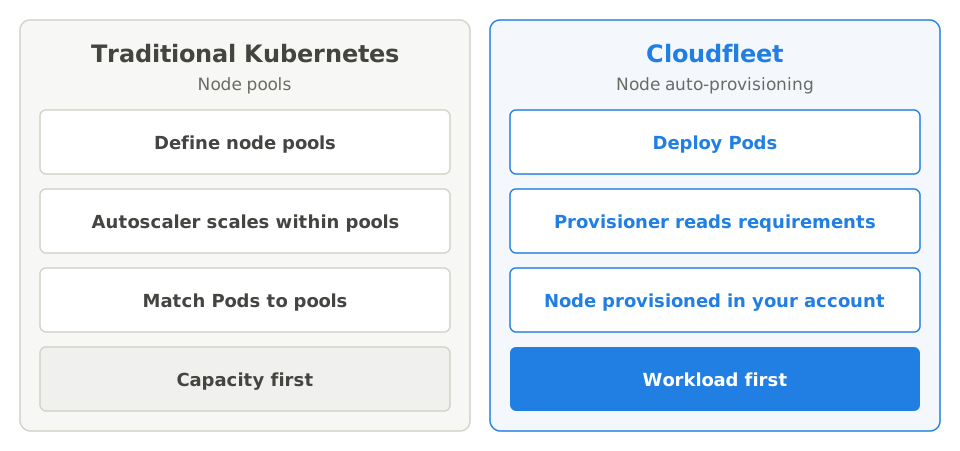
In traditional Kubernetes environments like EKS, GKE, AKS, or self-managed clusters, infrastructure provisioning follows a capacity-first approach. You must plan and provision nodes before you deploy workloads:
Define node pools upfront: Create groups of nodes with specific instance types, sizes, and configurations. For example, you might create a “general-purpose” pool with
m5.largeinstances and a “gpu-workloads” pool withp3.2xlargeinstances.Set scaling boundaries: Configure minimum and maximum node counts for each pool. The cluster autoscaler operates within these boundaries. It scales up when Pods are pending and scales down when nodes are underutilized.
Match workloads to pools: Use node selectors, taints, tolerations, or affinity rules to make sure Pods land on appropriate node pools. A machine learning job targets the GPU pool. A web server targets the general-purpose pool.
Manage multiple configurations: As your workloads become more diverse, complexity grows. Different teams need different instance types. Some workloads need spot instances for cost savings. Others require specific CPU architectures. Each requirement often means another node pool to configure and maintain.
The challenge: This model requires you to predict your infrastructure needs before deploying workloads. You must decide on instance types, plan for peak capacity, and continuously tune your node pool configurations. Overprovisioning wastes money. Underprovisioning causes deployment failures.
Cloudfleet: workload-driven provisioning
Cloudfleet inverts this model with a workload-first approach. Instead of configuring infrastructure in advance to match expected workloads, you deploy workloads and Cloudfleet provisions the optimal infrastructure automatically.
Cloudfleet offers two complementary approaches to node provisioning:
| Aspect | Node auto-provisioning | Self-managed nodes |
|---|---|---|
| How it works | Cloudfleet automatically provisions optimal nodes based on your Pod specifications | You provision machines and register them with Cloudfleet |
| Supported infrastructure | AWS, GCP, Hetzner Cloud | Any Linux server (cloud, on-premises, edge, bare metal) |
| Capacity planning | None required. Cloudfleet adds and removes nodes automatically | You manage capacity and availability |
| Node lifecycle | Automated provisioning, replacement, and deletion. Running nodes are not upgraded in place. New nodes join with the control plane’s current Kubernetes version | You manage the underlying infrastructure. Cloudfleet manages Kubernetes components |
| Cost optimization | Automatic instance type selection, bin-packing, and spot instance support | You control costs through your own provisioning and purchasing decisions |
| Best for | Primary compute on supported cloud providers | On-premises data centers, other cloud providers, specialized hardware, compliance requirements |
Node auto-provisioning through Fleets
Node auto-provisioning is Cloudfleet’s main capability for supported cloud providers. The key change from traditional Kubernetes: you never create or manage node pools. You deploy workloads, and Cloudfleet handles everything else.
How it works
Connect your cloud account: Create a Fleet that authorizes Cloudfleet to provision resources in your AWS, GCP, or Hetzner Cloud account. A Fleet defines which regions, instance families, and capacity types (on-demand, spot) Cloudfleet can use.
Deploy your workloads: Submit Pods with resource requests (CPU, memory, GPU) and optional scheduling constraints (node selectors, affinity rules, topology spread). This is standard Kubernetes. No Cloudfleet-specific configuration is required.
Cloudfleet analyzes requirements: When a Pod enters the
Pendingstate because no suitable node exists, the node auto-provisioner analyzes the Pod’s requirements. These are resource requests, node selectors, affinity rules, and topology constraints.Optimal node provisioning: Cloudfleet selects the most cost-effective instance type that satisfies all requirements. It considers your Fleet’s constraints (allowed regions, instance families, spot vs on-demand) and provisions the node directly in your cloud account.
Automatic cleanup: When Pods are deleted or scaled down, Cloudfleet identifies underutilized nodes and automatically terminates or consolidates them. You pay for compute only when you need it.
Example deployment
# Just deploy your workload. Cloudfleet handles the infrastructure.
apiVersion: apps/v1
kind: Deployment
metadata:
  name: my-app
spec:
  replicas: 3
  selector:
    matchLabels:
      app: my-app
  template:
    metadata:
      labels:
        app: my-app
    spec:
      containers:
      - name: my-app
        image: my-app:latest
        resources:
          requests:
            memory: "512Mi"
            cpu: "500m"
          limits:
            memory: "1Gi"
            cpu: "1000m"
When you apply this Deployment, Cloudfleet examines the resource requests (512Mi memory, 500m CPU per replica). It considers the total requirements for all three replicas and provisions the most cost-effective node configuration. If you later scale to 10 replicas, Cloudfleet automatically provisions additional capacity. When you scale back down, Cloudfleet terminates unused nodes.
Controlling node selection without node pools
Cloudfleet handles provisioning automatically, but you keep full control over where and how your workloads run. Use standard Kubernetes scheduling mechanisms:
- Resource requests: Specify CPU, memory, and GPU requirements. Cloudfleet provisions nodes with sufficient capacity.
- Node selectors: Target specific cloud providers, regions, availability zones, or instance types with well-known labels.
- Node affinity: Define complex placement rules with required or preferred constraints.
- Topology spread: Distribute Pods across availability zones or regions for high availability.
- Taints and tolerations: Reserve specific node types for particular workloads.
# Example: Run on AWS spot instances in eu-west-1
spec:
  nodeSelector:
    cfke.io/provider: aws
    topology.kubernetes.io/region: eu-west-1
  affinity:
    nodeAffinity:
      requiredDuringSchedulingIgnoredDuringExecution:
        nodeSelectorTerms:
        - matchExpressions:
          - key: karpenter.sh/capacity-type
            operator: In
            values:
            - spot
The key difference from traditional Kubernetes: you express requirements at the workload level, not the infrastructure level. You do not create a “spot instances in eu-west-1” node pool in advance. You tell Cloudfleet what you need, and it provisions matching infrastructure on demand.
For complete details on all available labels and scheduling options, see the Node auto-provisioning documentation.
Self-managed nodes
Self-managed nodes extend your Cloudfleet cluster to infrastructure that Cloudfleet cannot provision directly. Examples are on-premises servers, cloud providers without native Fleet support, edge locations, specialized hardware, or any scenario where you need direct control over the underlying machines.
How it works
With self-managed nodes, the provisioning model differs from node auto-provisioning:
You provision the infrastructure: Create VMs, provision bare-metal servers, or configure existing machines. The machines must run a supported operating system (Ubuntu 22.04 or 24.04, Debian 12 or 13, or the RHEL family 9 or 10). They must also have SSH access, or support cloud-init.
Register nodes with Cloudfleet: Use the Cloudfleet CLI or Terraform to register each machine with your cluster. Cloudfleet connects through SSH, installs the required components (kubelet, container runtime, networking), and joins the node to your cluster.
Cloudfleet manages Kubernetes components: After registration, Cloudfleet handles Kubernetes-level operations: kubelet configuration, certificate rotation, and CNI networking. Your nodes participate fully in the cluster and can run any workload.
You manage the underlying infrastructure: Hardware failures, OS updates, capacity planning, and machine lifecycle are your responsibility. Cloudfleet does not automatically replace failed self-managed nodes.
Use cases for self-managed nodes
Self-managed nodes are the right choice when:
On-premises requirements: Your workloads must run in your own data centers due to data sovereignty, compliance, or latency requirements. See the Proxmox guide for an example of on-premises virtualization.
Other cloud providers: You use cloud providers like OVH, Scaleway, Vultr, Exoscale, or regional providers where node auto-provisioning is not available yet.
Specialized hardware: Your workloads require specific GPU models, FPGAs, custom networking cards, or other hardware not available through standard cloud instance types.
Existing infrastructure investments: You have existing servers, reserved instances, or committed use discounts that you want to use in your Kubernetes cluster.
Edge and hybrid deployments: You need to run workloads close to users or data sources in locations without direct cloud provider presence.
Adding self-managed nodes
You can add self-managed nodes with the Cloudfleet CLI or Terraform. Both methods connect to your server through SSH, configure it, and register the node with your cluster. The CLI then waits until the node reports Ready and prints a summary of it.
Using the CLI:
cloudfleet clusters add-self-managed-node CLUSTER_ID \
  --host HOST_IP \
  --ssh-username SSH_USERNAME \
  --ssh-key SSH_KEY_LOCATION \
  --region DATACENTER_REGION \
  --zone DATACENTER_ZONE
Using Terraform:
resource "cloudfleet_cfke_self_managed_node" "worker" {
  cluster_id = cloudfleet_cfke_cluster.example.id
  region     = "on-premises"
  zone       = "datacenter-1"

  ssh {
    host             = "192.168.1.100"
    user             = "ubuntu"
    private_key_path = "~/.ssh/id_rsa"
  }
}
The region and zone values you specify become Kubernetes node labels (topology.kubernetes.io/region and topology.kubernetes.io/zone). You can then target self-managed nodes with standard node selectors. Your workload definitions stay portable and consistent with auto-provisioned nodes. To add more labels and taints at registration, use the CLI’s --label and --taint flags, or node_labels and node_taints in Terraform.
Automating self-managed node provisioning
You manage the underlying infrastructure, but you can automate the entire provisioning pipeline with Terraform. Combine cloud provider Terraform resources (to create VMs) with the Cloudfleet Terraform provider (to register nodes) for fully automated infrastructure-as-code deployments.
For complete Terraform examples with specific cloud providers, see the guides for:
For complete details on requirements, GPU support, and node removal, see the Self-managed nodes documentation.
Choosing the right approach
Use this decision framework to choose the provisioning method that fits your needs:
Is your infrastructure on AWS, GCP, or Hetzner Cloud?
│
├── Yes → Use node auto-provisioning (Fleets)
│
│         Benefits:
│         • Zero capacity planning or node pool management
│         • Automatic scale-up and scale-down
│         • Cost optimization through intelligent instance selection
│         • Managed node lifecycle (provisioning, replacement, deletion)
│         • Pay only for compute when workloads are running
│
└── No → Use self-managed nodes

          When to use:
          • Other cloud providers (OVH, Scaleway, Vultr, Exoscale, etc.)
          • On-premises data centers and private clouds
          • Edge locations and remote sites
          • Specialized hardware (specific GPUs, FPGAs, custom networking)
          • Compliance requirements mandating infrastructure control
          • Leveraging existing hardware investments
Combining both approaches
Many Cloudfleet users combine both approaches in a single cluster to use the strengths of each. All nodes, auto-provisioned or self-managed, connect to each other through Cloudfleet’s secure overlay network. Workloads on an AWS node can communicate directly with workloads on an on-premises server, as if they were on the same local network. For details on how this works, see the networking architecture documentation.
Node auto-provisioning for elastic, general-purpose compute on supported cloud providers. Web applications, batch jobs, and variable workloads benefit from automatic scaling and cost optimization.
Self-managed nodes for specific requirements that demand infrastructure control. On-premises databases, GPU training clusters with specific hardware, or workloads with strict compliance requirements.
Kubernetes scheduling features let you control which workloads run on which nodes. Use node selectors to target specific infrastructure:
# Example: Run only on self-managed on-premises nodes
spec:
  nodeSelector:
    topology.kubernetes.io/region: on-premises
topology.kubernetes.io/zone: datacenter-1# Example: Run on auto-provisioned cloud nodes, avoid on-premises
spec:
nodeSelector:
cfke.io/provider: aws
affinity:
nodeAffinity:
requiredDuringSchedulingIgnoredDuringExecution:
nodeSelectorTerms:
- matchExpressions:
- key: topology.kubernetes.io/region
operator: NotIn
values:
- on-premisesFrequently asked questions
Q: Do I need to create node pools in Cloudfleet?
No. With node auto-provisioning, Cloudfleet dynamically provisions the right nodes based on your workload specifications. There are no predefined node pools to configure or manage. You express your requirements at the workload level (resource requests, node selectors, affinity rules), and Cloudfleet provisions matching infrastructure on demand.
This eliminates the operational overhead of maintaining multiple node pool configurations and the risk of capacity mismatches between pools and workloads.
Q: What happens when I delete a Deployment?
With node auto-provisioning, Cloudfleet continuously monitors node utilization. When Pods are deleted and nodes become underutilized, Cloudfleet cordons the node, drains remaining Pods to other nodes, and terminates the instance. You pay for infrastructure only while it is in use.
For self-managed nodes, the nodes remain in your cluster until you explicitly remove them. Cloudfleet does not automatically terminate self-managed infrastructure.
Q: How do I ensure high availability?
Use Kubernetes topology spread constraints to distribute Pods across failure domains. For auto-provisioned nodes, Cloudfleet provisions nodes in the appropriate availability zones to satisfy your constraints:
spec:
  topologySpreadConstraints:
  - maxSkew: 1
    topologyKey: topology.kubernetes.io/zone
    whenUnsatisfiable: DoNotSchedule
    labelSelector:
      matchLabels:
        app: my-app
For self-managed nodes, register nodes across multiple zones or racks. Use the region and zone labels to enable topology-aware scheduling.
Q: Can I migrate from traditional node pools to Cloudfleet?
Yes. Your existing Kubernetes workloads work without modification. Deployments, StatefulSets, Jobs, and other resources use standard Kubernetes APIs. Deploy them to your CFKE cluster, and Cloudfleet handles the infrastructure.
Any node selectors or affinity rules that you defined continue to work. Cloudfleet recognizes standard Kubernetes labels (topology.kubernetes.io/zone, node.kubernetes.io/instance-type, etc.) and provisions matching nodes automatically.
Q: How does Cloudfleet choose which instance type to provision?
Cloudfleet’s node auto-provisioner evaluates all instance types available in your Fleet configuration and selects the most cost-effective option that satisfies the Pod’s requirements. It considers:
- Resource requests (CPU, memory, GPU)
- Node selectors and affinity rules
- Fleet constraints (allowed regions, instance families, capacity types)
- Current spot pricing and availability
- Bin-packing efficiency (fitting multiple Pods on a single node when possible)
You do not need to specify instance types unless you have specific requirements. Cloudfleet handles the optimization automatically.
Q: What is the difference between node auto-provisioning and self-managed nodes?
Node auto-provisioning is a fully automated system where Cloudfleet creates, manages, and deletes cloud instances based on your workload requirements. You never interact with the underlying VMs directly. Node auto-provisioning is available for AWS, GCP, and Hetzner Cloud.
Self-managed nodes are machines you provision and control. You create the VM or bare-metal server, then register it with Cloudfleet. Cloudfleet installs Kubernetes components and manages the node’s cluster membership. You are responsible for the underlying infrastructure. Use self-managed nodes for on-premises servers, other cloud providers, or specialized hardware requirements.
Q: Can I use both node auto-provisioning and self-managed nodes in the same cluster?
Yes. This is a common pattern. Use node auto-provisioning for elastic cloud workloads that benefit from automatic scaling and cost optimization. Use self-managed nodes for on-premises databases, specialized GPU hardware, or workloads with specific compliance requirements. Kubernetes scheduling features let you control which workloads run on which type of node.
Q: Will node auto-provisioning support more cloud providers in the future?
Yes. Cloudfleet is working to expand node auto-provisioning support to additional cloud providers. Until then, you can use self-managed nodes with Terraform to automate node provisioning on any cloud provider. Check the release notes for announcements about new provider support.
Next steps
- Node auto-provisioning: Details on workload-driven provisioning, scheduling constraints, and available labels
- Self-managed nodes: Complete guide for bringing your own infrastructure, including GPU support
- Terraform provider: Automate cluster and node provisioning with infrastructure-as-code
- Fleets: Configure cloud provider connections and define provisioning constraints
- Kata Containers: Run untrusted and AI-generated workloads with VM-level isolation on Kata-enabled nodes
- Getting started: Deploy your first application on Cloudfleet
← What is Cloudfleet?