What is Cloudfleet?
Cloudfleet’s mission is to transform infrastructure management with automated, scalable solutions that unify resources across datacenters, clouds, and edge environments. We aim to provide just-in-time infrastructure, automated upgrades, and advanced permissions management, all through a single interface.
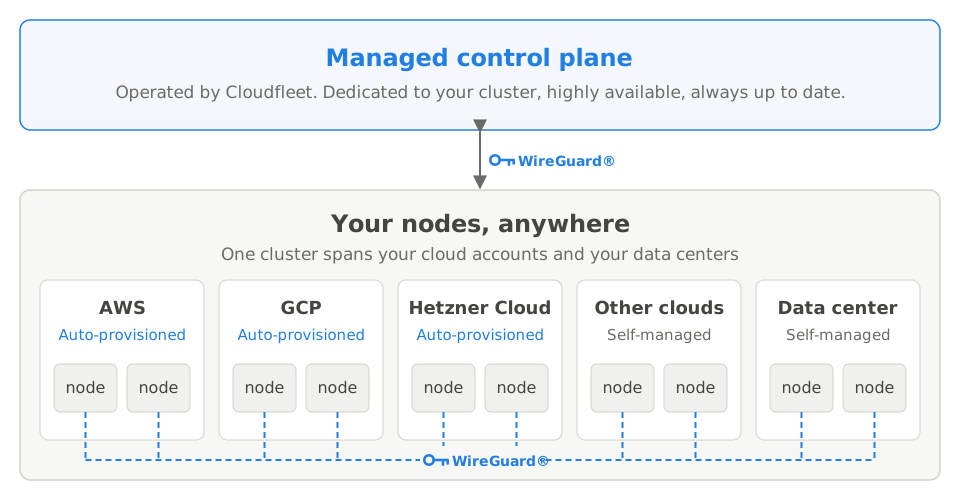
Cloudfleet Kubernetes Engine (CFKE) is a fully managed Kubernetes service. It runs containerized workloads on clusters that span multiple cloud providers and on-premise environments. CFKE centralizes your whole infrastructure footprint with a single managed Kubernetes control plane.
Kubernetes is an open-source system that automates the deployment, scaling, and management of containerized applications. Cloudfleet delivers a fully CNCF-conformant Kubernetes service, so any workload compatible with Kubernetes can run on Cloudfleet Kubernetes Engine (CFKE).
What is Cloudfleet good for?
Cost optimization
Cloudfleet helps organizations optimize the cost-efficiency of their entire application portfolio across all dimensions. Instead of asking you to define rigid capacity sizes when you create your cluster, before you deploy your first workload, Cloudfleet works backward from your actual workload requirements. You deploy your applications, and Cloudfleet determines the optimal size, cost, and location of the infrastructure to run them. You can always define specific constraints, such as a particular jurisdiction or a specific machine type, and Cloudfleet handles the rest.
With Pod labels, you can move your workloads to spot instances, to newer and more cost-effective instances, or to different architectures like ARM.
Multi-cloud flexibility
Cloudfleet does not lock you into a specific cloud provider, region, or data center. You connect your cloud accounts to Cloudfleet, and Cloudfleet provides a consistent experience across all of them. You can run your workloads on different clouds at the same time, or migrate them between cloud environments.
Cloudfleet’s architecture differs from other multi-cloud Kubernetes solutions. Cloudfleet is not only a Kubernetes distribution compatible with various clouds. It offers a single, managed cluster that manages compute power across different clouds at the same time. You use one unified Kubernetes cluster to deploy and monitor applications on multiple clouds and to move workloads between them.
Hybrid cloud integration
In addition to public clouds, Cloudfleet offers first-class support for on-premise infrastructure. You can add any Linux server to your Cloudfleet Kubernetes cluster and manage your on-premise assets in the same way as public cloud resources. Cloudfleet connects multiple clouds and regions, and it also securely connects your data centers. You manage your on-premise capacity through a single Kubernetes cluster.
For example, most of your applications might run in your on-premise data centers. A specific machine learning training job might need custom hardware that only a public cloud provider offers. With Cloudfleet, your applications run as usual, and the job “spills over” to the cloud for as long as it needs.
Edge computing capabilities
If you manage applications across multiple sites, you can add your edge infrastructure as Kubernetes nodes to Cloudfleet. Your edge locations connect securely to each other and to Cloudfleet’s control plane. You manage all your edge locations through a single Kubernetes interface. An edge location needs only an internet connection to become part of Cloudfleet.
For example, a manufacturing company might have multiple production sites, each with its own mini data center. The company can use Cloudfleet to deploy and manage the lifecycle of applications across these sites. It can monitor all workloads from its headquarters.
Features of Cloudfleet
Node auto-provisioning
With CFKE on supported cloud providers (AWS, GCP, and Hetzner Cloud), you don’t provision nodes upfront as in traditional Kubernetes. You deploy your workloads, and Cloudfleet automatically provisions the optimal nodes to run them. The system selects the most cost-effective compute instances, scales resources as needed, and removes unused nodes to minimize costs.
You do not plan capacity upfront. You do not need to predict future resource needs or size infrastructure before you know your actual workload patterns. Deploy your applications, and Cloudfleet determines the right infrastructure configuration. As applications grow or shrink, nodes adjust automatically to match demand.
Cost optimization happens automatically through instance selection and aggressive scale-down policies. Cloudfleet continuously evaluates available instance types across configured cloud providers and selects the most cost-effective options. The platform can even choose the cheapest cloud region globally, unless you specify geographic constraints. When you delete or scale down Pods, Cloudfleet promptly removes or consolidates nodes so they do not sit idle.
Cloudfleet manages the entire node lifecycle automatically, not only initial provisioning. Cloudfleet does not upgrade running nodes in place. New nodes join with the control plane’s current Kubernetes version, and existing nodes keep their version until they are replaced. To upgrade a node sooner, drain it, and the node auto-provisioner replaces it. See Kubernetes versions and upgrades. The system continuously monitors node health and replaces unhealthy nodes before they affect application availability. If you use spot instances or preemptible VMs and the cloud provider reclaims capacity, Cloudfleet automatically provisions replacement nodes.
Cloudfleet continuously adds native integrations for more cloud providers. For more information, refer to the Node auto-provisioning documentation.
Managed control plane
CFKE provides a managed Kubernetes control plane that ensures high availability and scalability of Kubernetes API servers and the persistence layer. In the Pro version and above, CFKE deploys the control plane across multiple Availability Zones (AZs) for resilience. It also automatically replaces unhealthy control plane nodes.
Kubernetes compatibility and support
CFKE runs upstream Kubernetes and follows Kubernetes conformance standards. You can use existing plug-ins and tools from the Kubernetes ecosystem. Applications on CFKE can run alongside or migrate to other standard Kubernetes environments, on-premises or in public clouds, without code refactoring. For details about the Kubernetes version lifecycle, see Kubernetes version management.
Easy to start
Cloudfleet offers a Basic plan that lets you explore the platform and its features for a low monthly base fee. Every new account receives €200 in credit, valid for 30 days and applied to your entire bill, so you can get started quickly. The Basic plan includes a fully managed Kubernetes control plane, with no cluster size limit. It lets you deploy and run containerized workloads across multiple cloud providers and on-premise environments. Many customers use the Basic plan for hobby projects, prototypes, and development. For more information, refer to the Pricing documentation.
Hybrid deployments
Cloudfleet supports hybrid deployments: self-managed Linux servers can join your cluster. You can integrate infrastructure from any cloud provider, on-premises data centers, or edge locations. You can provision self-managed nodes with Terraform or add them manually. Cloudfleet is infrastructure-agnostic beyond the natively supported cloud providers. For more information, refer to the self-managed nodes documentation.
Global secure networking
CFKE creates a secure, encrypted network that connects nodes across clouds and regions. One Kubernetes cluster can span different cloud providers and on-premise environments. Workloads across regions and datacenters operate as if they are on the same network. For more information, refer to the Networking Architecture documentation.
Access to public cloud APIs
Workloads on CFKE can securely access public cloud APIs without hard-coded credentials. CFKE uses OIDC for this integration. It supports services from providers such as AWS, GCP, and Azure, and any third-party APIs compatible with OIDC. For more information, refer to the Public Cloud APIs documentation.
Frequently asked questions
Q: What can I do with Cloudfleet Kubernetes Engine (CFKE)?
With Cloudfleet Kubernetes Engine, you can run any containerized workloads on a Kubernetes cluster that spans multiple cloud providers and on-premise environments. CFKE provides a single Kubernetes control plane that manages nodes in different cloud providers and on-premise environments.
CFKE is useful if you need to support multiple cloud providers, or to distribute workloads geographically within one cloud provider. You can also run workloads primarily on-premise and burst to the cloud when needed. CFKE simplifies migrations between cloud providers and on-premise environments.
CFKE fits many use cases where you run workloads on multiple cloud providers and on-premise environments.
Q: What are the differences between Cloudfleet Kubernetes Engine (CFKE) and other multi-cloud Kubernetes solutions?
CFKE provides a single Kubernetes control plane that manages nodes in different cloud providers and on-premise environments at the same time. A single Kubernetes cluster can span multiple cloud providers and on-premise environments. CFKE also gives you a single pane of glass to manage your infrastructure across these environments.
In CFKE, workloads communicate with each other over a secure overlay network in the same IP space. Workloads on different cloud providers and on-premise environments run as if they are in the same network.
Other solutions need multiple Kubernetes clusters, one for each cloud provider or on-premise environment. Infrastructure across these environments is then difficult to manage and maintain. Moving workloads between clusters requires migration efforts.
Q: How long does it take to create a Cloudfleet Kubernetes Engine (CFKE) cluster?
Creation of a CFKE cluster takes a little less than 2 minutes.
Q: How do I add nodes to my Cloudfleet Kubernetes Engine (CFKE) cluster?
Unlike traditional Kubernetes offerings, CFKE manages the infrastructure in your cluster based on your workload specifications.
CFKE can automatically provision nodes in supported cloud providers (currently AWS, GCP, and Hetzner Cloud) based on your workload specifications. With node auto-provisioning, you do not decide the number or type of nodes to add to your cluster. CFKE provisions the nodes based on your workload requirements and repairs them. You only need to configure a Fleet in the Cloudfleet Console. A Fleet is a collection of nodes that CFKE manages in one or more supported cloud providers. See the Fleet and Fleet Types section for more information.
After you configure a Fleet, deploy your Kubernetes workloads to the cluster. CFKE automatically provisions nodes in the cloud provider that you configured in the Fleet. It bases this on factors such as the number of Pods and the CPU and memory requirements. CFKE offers a large set of configurations to fine-tune node provisioning. See the Node auto-provisioning section for more information.
For infrastructure beyond the natively supported cloud providers, CFKE supports self-managed nodes. Self-managed nodes are any Linux servers that you add to your CFKE clusters, from other cloud providers, on-premises data centers, or edge locations. You can provision self-managed nodes automatically with Terraform, or add them manually in a few steps. Cloudfleet continuously adds native integrations for more cloud providers, and self-managed nodes support any infrastructure today. See the self-managed nodes section for more information.
Q: How much does Cloudfleet Kubernetes Engine (CFKE) cost?
Cloudfleet offers three plans: Basic, Pro, and Enterprise. Each plan has a flat monthly base fee that includes a set number of vCPUs, plus a per-vCPU fee for usage above that allotment. No plan has a cluster size limit. The Basic plan starts at €12/mo and suits hobby projects, prototypes, and development. For critical production workloads, the Pro plan offers better availability and support. You need a payment method at signup. Every new account receives €200 in credit, valid for 30 days and applied to your entire bill.
To learn more about the plans and their pricing, see the Pricing section.
Q: How do I get started with Cloudfleet Kubernetes Engine?
To get started with Cloudfleet, create an organization or accept an invitation to an existing organization. To learn how to create a new organization, see the Getting Started section.
Q: What if I need nodes from a cloud provider without node auto-provisioning?
Node auto-provisioning currently works with AWS, GCP, and Hetzner Cloud. For any other infrastructure, add nodes as self-managed nodes. Self-managed nodes support any cloud provider, on-premises servers, or edge devices. Cloudfleet continuously adds native integrations for more cloud providers. Until then, self-managed nodes (particularly with Terraform) work for any infrastructure. See How Cloudfleet provisions nodes for a comparison of both approaches. For setup instructions, see the self-managed nodes guide.
Q: Can I mix auto-provisioned and self-managed nodes?
Yes. You can use node auto-provisioning for workloads on supported cloud providers and self-managed nodes for specific requirements or unsupported infrastructure. Kubernetes scheduling features let you control which workloads run where.
Q: How long does it take for nodes to appear after deploying a workload?
Typically 2-4 minutes from when a Pod enters Pending state. This includes analyzing Pod requirements (seconds), provisioning cloud infrastructure (1-3 minutes), and joining the node to the cluster (30-60 seconds).
Q: What happens if my Fleet hits its CPU limit?
Pods remain in Pending state until resources become available. Increase the Fleet’s CPU limit, add another Fleet with a different cloud provider, or delete some existing workloads to free up capacity.
Q: How does node auto-provisioning affect my cloud bill?
You pay your cloud provider directly for the infrastructure Cloudfleet provisions. The difference is that you pay for nodes only while they are needed, not for idle capacity. Cloudfleet’s control plane has its own pricing (see Pricing).