Egress Gateways
With Cloudfleet Kubernetes Engine (CFKE), you can define specific egress points for your workloads. CFKE integrates Cilium’s Egress Gateway feature for this purpose. This document explains how to configure and use Egress Gateways so that outbound traffic from selected Pods comes from a predictable, static IP address.
Use this feature when your applications access external services with IP-based allowlisting, or when you need a consistent source IP for auditing or logging.
Another use case is access from your cloud instances to protected on-premises resources. In this case, set up a self-managed on-premises node that can access these resources. Your Pods on cloud instances then access these resources through the self-managed node.
How it works
The Cilium Egress Gateway feature routes outbound traffic from specified Pods through a designated “gateway” node (or one of a set of gateway nodes). On this gateway node, the traffic is Source NAT’d (SNAT’d) to a specific IP address (the egressIP) before it leaves the cluster.
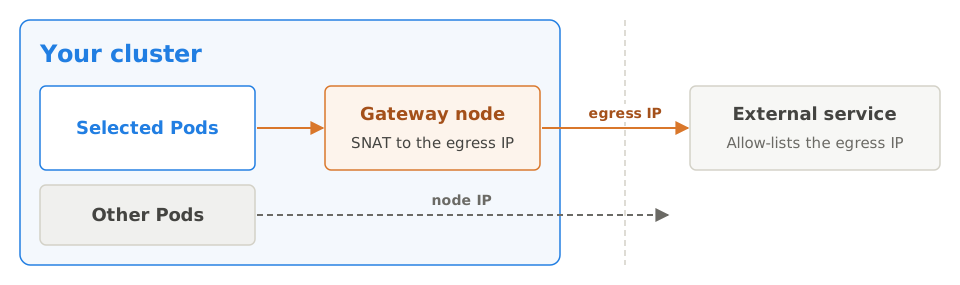
- Policy definition: You create a
CiliumEgressGatewayPolicyresource. - Pod selection: The policy selects specific Pods based on labels, namespaces, or both.
- Destination matching: The policy also specifies the external destination CIDRs that the egress rule applies to.
- Gateway node selection: You define which node(s) in your cluster act as the egress gateway, typically with node labels.
- Egress IP assignment: You specify the static IP address (
egressIP) to use as the source IP for this outbound traffic. This IP must be configured on an interface of the selected gateway node(s). - Traffic routing: Cilium routes traffic from the selected Pods to the specified CIDRs through the chosen gateway node. Cilium masquerades this traffic with the
egressIP.
Crafting the CiliumEgressGatewayPolicy manifest
To implement an Egress Gateway, create a YAML manifest for a CiliumEgressGatewayPolicy custom resource. This resource tells Cilium how to handle the egress traffic.
The key fields in the CiliumEgressGatewayPolicy manifest are:
apiVersion: cilium.io/v2
kind: CiliumEgressGatewayPolicy
metadata:
  name: my-app-egress-policy # A unique name for your policy
spec:
  # 1. Select the source pods this policy applies to
  selectors:
    - podSelector:
        matchLabels:
          app: my-app
          # To select pods in a specific namespace, use the 'io.kubernetes.pod.namespace' label:
          # io.kubernetes.pod.namespace: my-namespace
      # You can also select entire namespaces:
      # namespaceSelector:
      #   matchLabels:
      #     team: backend-team

      # To select all pods, you can use NotIn with a non-existing label:
      #    matchExpressions:
      #        # All
      #        - {key: not-existing, operator: NotIn, values: [not-existing]}

  # 2. Specify the external destination CIDRs this policy applies to
  destinationCIDRs:
    - "192.0.2.0/24"   # Example external service CIDR
    - "203.0.113.10/32" # Example specific external IP
    # To route all traffic from selected pods through the egress gateway, use:
    # - "0.0.0.0/0"

  # 3. Configure the Egress Gateway node and IP
  egressGateway:
    # Select the node(s) that will act as the egress gateway
    nodeSelector:
      matchLabels:
        # Ensure this label exists on your intended gateway node(s)
        kubernetes.io/hostname: self-managed-egress-node

    # (Optional) The static IP address to be used for egress traffic.
    # This IP MUST be configured on a network interface of the selected gateway node(s).
    egressIP: "10.0.1.100" # Replace with your desired static egress IP

    # (Optional) Alternatively, specify the interface name on the gateway node.
    # Cilium will use the first IPv4 address assigned to this interface.
# interface: "ethX"spec.selectors: This array defines which Pods the egress policy applies to.
podSelector: Uses standard Kubernetes label selectors (
matchLabelsormatchExpressions) to identify Pods.- To target Pods in a specific namespace, use the
io.kubernetes.pod.namespace: <namespace-name>label in thepodSelector.
- To target Pods in a specific namespace, use the
namespaceSelector: Uses standard Kubernetes label selectors to identify all Pods in matching namespaces.
spec.destinationCIDRs: An array of strings. Each string is an IP CIDR notation (for example,
1.2.3.0/24,4.5.6.7/32). The egress policy only applies to traffic from the selected Pods to an IP address in these CIDRs. Traffic to all other destinations follows standard routing.spec.egressGateway: This object configures the gateway node and the IP address to use.
nodeSelector: A standard Kubernetes label selector that identifies the node(s) to use as egress gateways.
- Make sure that at least one node in your CFKE cluster has the labels specified here.
- If multiple nodes match, Cilium (in its standard configuration) typically selects the first node in lexical order by name. For High Availability (HA) setups, see the advanced Cilium documentation. The basic
CiliumEgressGatewayPolicyfocuses on a primary gateway.
egressIP (Optional): The static IP address to use as the source IP for outbound traffic that matches this policy.
- Crucial: You must manually configure this IP address on a network interface of the node(s) that
nodeSelectorselects. CFKE and Cilium do not provision this IP for you. They only use it if it is present on the gateway node.
- Crucial: You must manually configure this IP address on a network interface of the node(s) that
interface (Optional Alternative): If you do not specify
egressIP, you can specifyinterface. Cilium then uses the first IPv4 address assigned to this named network interface on the gateway node as the egress IP. If you specify neitheregressIPnorinterface, Cilium uses the first IPv4 address on the interface that holds the default route on the gateway node.
Key considerations
Node labeling: Label your intended gateway node(s) correctly so that the
nodeSelectorin your policy can identify them. To specify one single node, you can use thekubernetes.io/hostnamelabel. Preferably, use a self-managed node with a static name.Egress IP provisioning and configuration: This is the most critical step.
- The
egressIPin the policy must be an IP address that you provisioned and configured on a network interface of the chosen gateway node(s) in your CFKE environment. - This IP must be routable from your CFKE network to the external destinations.
- If you are unsure how to assign an additional IP to a node’s interface or make it routable, ask your network administrator or CFKE support.
- The
External firewalls: If you use the Egress Gateway to communicate with external services behind firewalls, add the chosen
egressIPto the allowlist of those firewalls.Cilium enablement: The Egress Gateway feature is enabled by default in CFKE’s Cilium installation. Make sure that your Cilium version supports it and that BPF masquerading is enabled (CFKE typically manages this).
Basic example manifest
A complete example of a CiliumEgressGatewayPolicy:
apiVersion: cilium.io/v2
kind: CiliumEgressGatewayPolicy
metadata:
  name: webapp-prod-egress-to-payment-gw
spec:
  selectors:
    - podSelector:
        matchLabels:
          app: webapp
          env: prod
          io.kubernetes.pod.namespace: production-apps
  destinationCIDRs:
    - "203.0.113.42/32" # IP of an external payment gateway
  egressGateway:
    nodeSelector:
      matchLabels:
        role: egress-node # Ensure this label is on your designated egress node
    egressIP: "172.16.100.50" # This IP must be configured on 'egress-node'
To apply the policy, save the manifest to a file (for example, my-egress-policy.yaml) and apply it with kubectl:
kubectl apply -f my-egress-policy.yamlVerification
To verify that your Egress Gateway policy is working:
Make sure the policy is applied and the gateway node has the correct
egressIPconfiguration.Exec into a Pod that matches the
podSelectorand (if applicable)namespaceSelectorof your policy.From the Pod, connect to an external service with an IP in the
destinationCIDRs. A common way to check your public-facing IP is:curl -4 ifconfig.me
The returned IP address is expected to match the egressIP in your policy. If it shows the Pod’s IP or the IP of the node that runs the Pod, the policy does not apply correctly to that traffic.
Troubleshooting
- Run
kubectl describe ciliumegressgatewaypolicy <policy-name>to see the status and events of the policy. - Verify network connectivity from the gateway node to the external destinations.
- Make sure the
egressIPis correctly configured on the gateway node’s interface and does not conflict with other IPs.- To verify the IP configuration, run
ip addr showon the gateway node.
- To verify the IP configuration, run
Known limitations
Setting
destinationCIDRsto0.0.0.0/0(to route all traffic through the egress gateway) also captures traffic to the Kubernetes API server, so Pods cannot reach it. To avoid this, exclude the API server endpoint from the policy. To find your cluster’s API server endpoint IP, check the endpoints of thekubernetesService:kubectl get endpoints kubernetes -n defaultThen add it to
excludedCIDRsin yourCiliumEgressGatewayPolicy:spec: destinationCIDRs: - "0.0.0.0/0" excludedCIDRs: - "API_SERVER_ENDPOINT_IP/32"The endpoint IP is specific to each cluster. If you are unsure about the right configuration for your cluster, contact Cloudfleet support.
Further reading
For in-depth information and advanced configurations, see the official Cilium Egress Gateway documentation: