Confidential Control Plane
The infrastructure behind Cloudfleet Kubernetes Engine (CFKE) stores all control plane data in encrypted form, on every tier. Confidential Control Plane is an opt-in feature for Enterprise clusters that adds two protections on top of this baseline:
- Keys in your HSM or KMS. The API server encrypts every Kubernetes object with keys that only your hardware security module (HSM) or cloud key management service (KMS) can unlock. The key is generated inside your HSM or KMS and never leaves it. Cloudfleet’s cloud environment stores only encrypted data. Without your key, neither the infrastructure provider nor Cloudfleet can decrypt stored copies of your data.
- Encrypted memory. The control plane components that handle decrypted data run on Confidential VMs. The processor encrypts their memory with a key that the hypervisor cannot read, so the data is encrypted in memory as well as on disk.
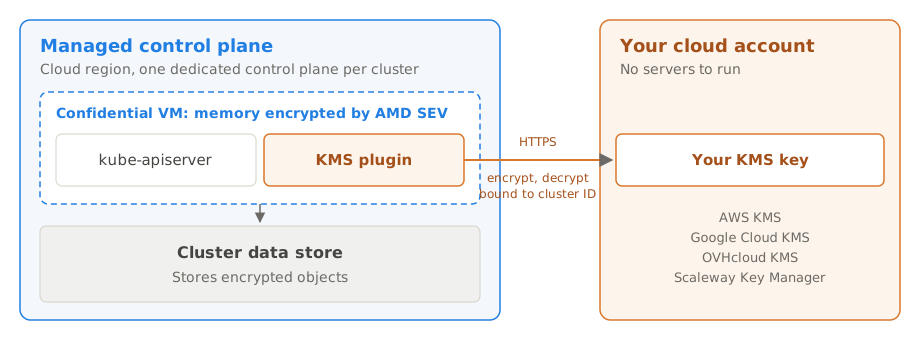
With a cloud KMS, such as AWS KMS, Google Cloud KMS, OVHcloud KMS or Scaleway Key Manager, the control plane calls your key directly. With an HSM in your own data center, key servers on your hosts connect the control plane to it. Cloudfleet operates the control plane, so while a cluster runs, its API servers hold decrypted data in memory. Your key store decides whether the control plane can obtain keys at all. See Limitations.
Regulated organizations often require that the keys protecting their data are held outside the infrastructure that stores it. Financial institutions build this into the cryptographic key management policies that DORA requires. Others rely on it to meet the key control criteria of the BSI C5 catalogue. It is also a common supplementary measure for personal data processed by non-EU providers after the Schrems II judgment.
The control plane is not meant to hold personal data, but an organization cannot fully control what its teams store in Secrets, ConfigMaps, annotations or custom resources. Confidential Control Plane protects that data as well. Disk snapshots, backups and copies of the cluster data store taken from Cloudfleet’s cloud environment cannot be decrypted without your key.
Scope
CFKE runs the control plane of each cluster in a control plane region on Google Cloud, its infrastructure provider. Worker nodes run on any cloud or on-premises. Confidential Control Plane applies only to the control plane. Worker nodes, workloads and the Kubernetes API remain unchanged.
| Standard CFKE cluster | With Confidential Control Plane | |
|---|---|---|
| Encryption at rest | Infrastructure encryption | Infrastructure encryption, plus object-level encryption |
| Encryption keys | Managed by the infrastructure provider | Key in your HSM or cloud KMS |
| Cluster data store backups | Infrastructure encryption | Readable only with your HSM or KMS |
| Memory of components that handle decrypted data | Standard VMs | Confidential VMs, memory encrypted by AMD SEV |
| Network traffic | TLS and WireGuard® | Unchanged |
Confidential Control Plane supports two topologies.
Cloud KMS. The KMS plugin calls a key in your cloud account directly. There are no servers to run on your side. Keys in AWS KMS, Google Cloud KMS with protection level hsm and OVHcloud KMS on HSM are held in HSMs of the provider.
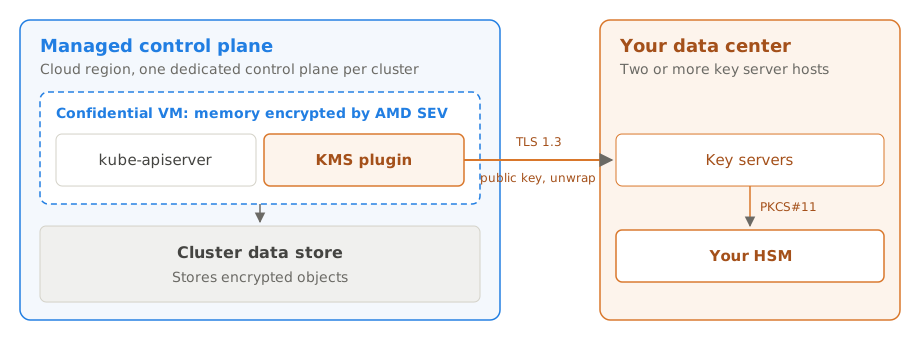
On-premises HSM. The KMS plugin reaches key servers in your data center over TLS 1.3, and the key servers use the key pair in your HSM through its PKCS#11 module. You run the key servers.
How it works
Confidential Control Plane uses the upstream Kubernetes KMS v2 provider interface. The API server encrypts each object with a data key, a symmetric key that it derives locally from a secret seed. The Cloudfleet KMS plugin, which runs next to the API server, protects each seed with your key before it is stored, and recovers it when an API server starts.
With a cloud KMS
The KMS plugin has your KMS key encrypt each new seed, bound to the cluster ID. When an API server starts, the KMS plugin has your key decrypt the seed. A seed encrypted for one cluster cannot be decrypted with the ID of another. The key never leaves your KMS. Every call is recorded in the audit log of your cloud account.
With an on-premises HSM
The KMS plugin protects each seed with the public key of your key pair:
- It encrypts the seed with a random one-time key, using AES-256-GCM. The encryption is bound to the cluster ID and the key version.
- It encrypts the one-time key with the RSA public key of your key pair, using RSA-OAEP with SHA-256.
- It stores both next to the encrypted objects.
When an API server starts, it needs its seeds back. The KMS plugin sends the protected seed to your key server. The key server checks the identity of the cluster, has your HSM decrypt the one-time key, and returns the seed only if it belongs to the cluster that asked.
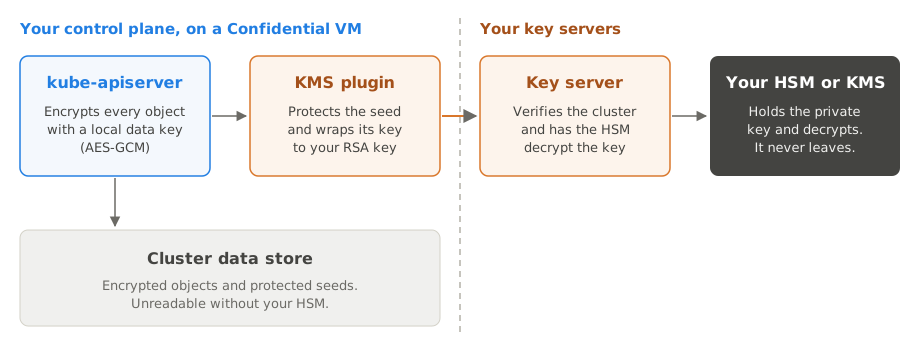
- Private key in your HSM. The RSA key pair is generated inside your HSM, and the private key cannot be exported. The HSM performs every decryption. The key server never holds the private key, only the one-time key of the seed it is unwrapping.
- Cluster binding. A protected seed opens only for the cluster it was created for. The key server takes the cluster from the caller’s identity, never from the request.
- Workload identity. The KMS plugin authenticates with a short-lived token signed with the service account signing key of your cluster, under the cluster’s own issuer,
https://api.cloudfleet.ai/v1/clusters/CLUSTER_ID. Workloads in the cluster cannot obtain such a token. Your key servers verify the token and answer only for the clusters you allow. No static credentials are issued. Because the CFKE control plane issues these tokens, what limits Cloudfleet is your list of allowed clusters and your control over the key servers, not the token. - TLS to your key servers. The KMS plugin connects to your key servers over TLS 1.3, with certificates from your own PKI, and trusts only your certificate authority.
In both topologies
Confidential Control Plane encrypts every Kubernetes object, including Secrets, ConfigMaps and custom resources. Encryption and decryption take place within the API server, so the feature is transparent to kubectl, controllers and applications. Write operations do not contact your key store and incur no additional network round trip.
Supported key stores
Confidential Control Plane works with the key store you already use.
| Key store | Examples | How the control plane reaches it |
|---|---|---|
| AWS KMS | A symmetric KMS key in your AWS account, including keys in an AWS CloudHSM custom key store | Directly, with no key server. The control plane assumes a role you create. See AWS KMS. |
| Google Cloud KMS | A symmetric key in Cloud KMS, including keys with protection level hsm in Cloud HSM | Directly, as your cluster’s principal in Cloudfleet’s workload identity pool. See Google Cloud KMS. |
| OVHcloud KMS | A symmetric key in OVHcloud Key Management Service | Directly, with an access certificate. See OVHcloud KMS. |
| Scaleway Key Manager | A symmetric key in Scaleway Key Manager | Directly, with an API key of an IAM application. See Scaleway Key Manager. |
| HSM in your data center | Thales Luna, Entrust nShield, Utimaco, Marvell LiquidSecurity, YubiHSM 2 | Through key servers on your hosts, with the vendor’s PKCS#11 module. See Set up with an on-premises HSM. |
| Dedicated cloud HSM without a KMS API | Thales Luna Cloud HSM, Azure Cloud HSM | On request. Contact your technical account manager. |
| Azure Key Vault and Managed HSM | On request. Contact your technical account manager. |
To keep keys in an HSM in the cloud, use a cloud KMS with HSM protection: AWS KMS, Google Cloud KMS with protection level hsm, or OVHcloud KMS on HSM. With AWS KMS, the key material can also stay in your own AWS CloudHSM cluster, through a custom key store.
With an on-premises HSM, the key pair must be an RSA key pair of at least 2048 bits, 3072 bits by default, whose private key can decrypt with RSA-OAEP. Every HSM listed above supports this.
Confidential VMs
While the API server runs, it holds decrypted objects in memory. On a standard VM, the hypervisor of the infrastructure provider can read that memory. On a Confidential VM, the memory itself is encrypted. Confidential Control Plane therefore runs every control plane component that handles decrypted data, or the cloud credentials used to manage your nodes, on Confidential VMs.
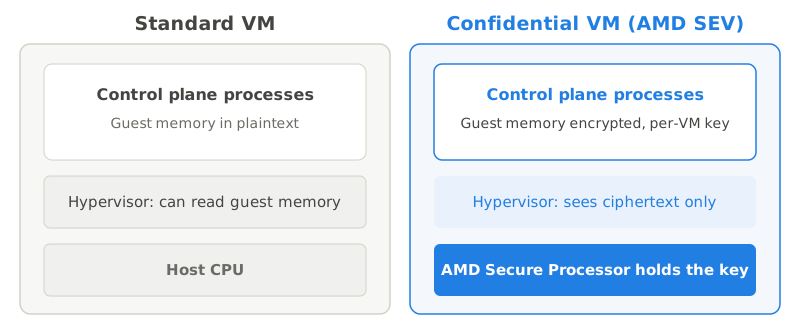
Confidential VMs use AMD Secure Encrypted Virtualization (SEV). The AMD Secure Processor generates a memory encryption key per VM and keeps it inside the processor. The memory controller encrypts data when it leaves the processor for RAM and decrypts it when it comes back, so the hypervisor and other workloads on the host see only ciphertext. The cluster data store runs on standard VMs because it stores only encrypted object contents.
Shared responsibility model
This section covers Confidential Control Plane. For the cluster as a whole, see Shared responsibility model. Confidential Control Plane divides operational responsibility between Cloudfleet and you. Cloudfleet operates the control plane and the software that connects it to your key servers. You operate the key servers and your HSM, so the availability of your clusters and the recoverability of their data depend on how you run them.
Cloudfleet is responsible for:
- Operating and updating the KMS plugin and the Confidential VMs of your control plane.
- Building, signing and providing the key server packages.
- Enabling Confidential Control Plane and encrypting the existing data of your cluster.
You are responsible for:
- Your key store: the key server hosts and your HSM, or your cloud KMS key and the permissions that let the control plane use it.
- Keeping the key servers reachable from the control plane on port 443.
- The availability of your key store. See Availability model.
- Your key, including its backup. Cloudfleet cannot recover a lost key, and without it the data of your clusters cannot be decrypted.
- The TLS certificates of the key servers, from your PKI.
- Installing key server updates and rotating keys.
Availability model
Your key store is part of the critical path of your cluster. With a cloud KMS, everything this section says about key servers applies to the KMS. The only difference is that the KMS also encrypts each new seed. That happens when the API server rotates its seed, not on every write. This section describes, based on the behavior of the Kubernetes KMS v2 provider, when the control plane needs them.
How the API server uses the key servers
- Writes. The API server derives a new data key for every write from a seed that it keeps in memory. The KMS plugin protects new seeds locally with your public key. Writes therefore never contact the key servers.
- Reads. Once the key servers unwrap a seed, the API server caches it for as long as the process runs. Reads of objects encrypted with a cached seed do not contact the key servers.
- Startup. When an API server starts, it reads all objects to fill its watch cache. The KMS plugin then asks the key servers to unwrap every seed that the stored objects use. Because many objects share a seed, this is a small number of requests. Until they succeed, the API server cannot read any objects.
Effect of a key server outage
| Event during the outage | Effect |
|---|---|
| Reads and writes on running API servers | Unaffected |
| Key rotation | Delayed until the key servers are reachable again |
| API server restart, for example during a control plane upgrade or maintenance | The restarted API server cannot read any objects until the key servers are reachable |
| All API servers of a cluster restarted | The Kubernetes API of the cluster is unavailable until the key servers are reachable |
Cloudfleet restarts API servers during control plane upgrades and routine maintenance. If your key servers are unreachable at that moment, the restarted API servers cannot read any objects until the key servers recover. Workloads that are already running keep running, but the cluster cannot be changed or scaled in the meantime.
Recommendations
- Run at least two key server hosts in separate failure domains, for example different data centers or power and network feeds.
- Monitor the key servers from outside your network, and alert when the key service is unreachable.
- Perform host maintenance one host at a time. The KMS plugin sends requests to the remaining hosts.
- Keep the network latency between the control plane region and your key servers low. The API server waits a few seconds for each KMS plugin call before it reports an error.
Set up with a cloud KMS
With a cloud key management service (KMS), there is no key server to run. The KMS plugin in your control plane calls your KMS key directly, and every encryption is bound to your cluster ID. The audit log of your cloud account records every encrypt and decrypt call.
Create the key in the account and region you choose, for example in a European region. Refer to the key by its full identifier, not by an alias: an alias can later point to another key, and data encrypted under the previous key would no longer be readable.
On AWS and Google Cloud, the KMS plugin uses the same Cloudfleet identity of your cluster as Fleets and private container registries, so no credentials are stored at Cloudfleet.
AWS KMS
Cloudfleet manages an IAM role for each cluster, cfke-CLUSTER_ID, in the Cloudfleet AWS account of your control plane region. You create a role in your account that this role can assume, and allow your role to use the key only for your cluster.
| Control plane region | Cloudfleet AWS account ID |
|---|---|
europe-central-1a | 902873844300 |
northamerica-central-1a | 891376988818 |
Step 1: Create the KMS key. Create a symmetric KMS key and note its ARN. To hold the key material in your own AWS CloudHSM cluster, create the key in an AWS CloudHSM key store instead. The control plane uses it the same way.
aws kms create-key --region eu-central-1 \
  --description "Cloudfleet Confidential Control Plane" \
  --key-spec SYMMETRIC_DEFAULT --key-usage ENCRYPT_DECRYPT
Step 2: Create the role. Create a role with this trust policy. Replace CLOUDFLEET_AWS_ACCOUNT_ID with the account ID from the table and CLUSTER_ID with the ID of your cluster:
{
  "Version": "2012-10-17",
  "Statement": [{
    "Effect": "Allow",
    "Principal": {"AWS": "arn:aws:iam::CLOUDFLEET_AWS_ACCOUNT_ID:role/cfke-CLUSTER_ID"},
    "Action": "sts:AssumeRole"
  }]
}
Allow the role to use the key only for your cluster:
{
  "Version": "2012-10-17",
  "Statement": [{
    "Effect": "Allow",
    "Action": ["kms:Encrypt", "kms:Decrypt", "kms:DescribeKey"],
    "Resource": "KEY_ARN",
    "Condition": {"StringEquals": {"kms:EncryptionContext:cluster": "CLUSTER_ID"}}
  }]
}
To limit the role to your cluster in the trust policy as well, add a condition on the session name, which is the cluster ID:
"Condition": {"StringEquals": {"sts:RoleSessionName": "CLUSTER_ID"}}Use a separate role for the key, not the role of your Fleet, so that each role has only the permissions it needs. The default key policy lets IAM policies in your account grant access to the key. If your key policy does not, add a statement for the role to the key policy instead.
Step 3: Ask Cloudfleet to enable Confidential Control Plane. Provide the cluster ID, the key ARN and the role ARN, as described in Enable Confidential Control Plane.
Enable automatic key rotation on the KMS key. AWS rotates the key material and keeps the previous versions, so existing data stays readable. AWS enforces a waiting period of at least seven days before it deletes a key, during which you can cancel the deletion.
Monitoring. AWS CloudTrail in your account records every call to the key. The caller is assumed-role/ROLE_NAME/CLUSTER_ID, the user agent contains app/cfke, and the encryption context contains cluster=CLUSTER_ID. Send CloudTrail to a trail with CloudWatch Logs or Amazon EventBridge, and alert on:
AccessDeniederrors for the role, which mean the control plane cannot use the key.DisableKey,ScheduleKeyDeletionandPutKeyPolicyon the key, and changes to the policy of the role, which take effect when the API servers next restart.- Calls with another value of
clusterin the encryption context.
Google Cloud KMS
The control plane uses the key as the principal of your cluster in Cloudfleet’s workload identity pool, without a service account key.
Step 1: Create the key. Create a key ring and a symmetric encryption key, for example with protection level hsm:
gcloud kms keyrings create cloudfleet --location europe-west3
gcloud kms keys create cfke --keyring cloudfleet --location europe-west3 \
  --purpose encryption --protection-level hsm
Step 2: Allow your cluster to use the key. Grant the principal of your cluster the role to encrypt and decrypt with the key. Replace CLUSTER_ID with the ID of your cluster:
gcloud kms keys add-iam-policy-binding cfke \
  --keyring cloudfleet --location europe-west3 \
  --role roles/cloudkms.cryptoKeyEncrypterDecrypter \
  --member "principal://iam.googleapis.com/projects/207152264238/locations/global/workloadIdentityPools/cfke/subject/CLUSTER_ID"
Every ciphertext is bound to your cluster ID as additional authenticated data.
Step 3: Ask Cloudfleet to enable Confidential Control Plane. Provide the cluster ID and the resource name of the key, as described in Enable Confidential Control Plane.
Set a rotation period on the key. Cloud KMS keeps the previous key versions, so existing data stays readable. Destroying a key version makes the data encrypted under it unreadable after the scheduled destruction period.
Monitoring. Cloud Audit Logs records encrypt and decrypt calls only when Data Access audit logs are enabled for Cloud KMS. Enable DATA_READ and DATA_WRITE audit logs for cloudkms.googleapis.com in the project of the key to see every use of the key by your cluster’s principal.
OVHcloud KMS
The control plane authenticates to OVHcloud Key Management Service (KMS) with an access certificate. Its private key is generated in your control plane and never leaves it.
Step 1: Create the key. In the OVHcloud Control Panel, order a KMS in the region you choose, for example in France. Create a symmetric encryption key of 256 bits in it and note its ID.
Step 2: Create the access certificate. Ask Cloudfleet for a certificate signing request (CSR) for your cluster, through a support ticket or your technical account manager. In the OVHcloud Control Panel, create an access certificate for the KMS from that CSR. Grant the identity of the certificate an IAM policy that allows only encrypt and decrypt operations with the key.
Step 3: Ask Cloudfleet to enable Confidential Control Plane. Provide the cluster ID, the KMS endpoint, the key ID and the access certificate, as described in Enable Confidential Control Plane.
Access certificates expire. Create a new certificate from a new CSR before the current one expires. To revoke access, delete the access certificate.
Scaleway Key Manager
Scaleway IAM does not support workload identity federation, so the control plane authenticates to Scaleway Key Manager with an API key of an IAM application in your organization. Cloudfleet stores the API key as a secret of your control plane, and you can revoke it at any time.
Step 1: Create the key. In the Scaleway console, create a key in Key Manager in the region you choose, for example fr-par, with the usage symmetric encryption and the algorithm AES-256-GCM. Note its ID.
Step 2: Create the API key. Create an IAM application for Cloudfleet, with a policy that grants only the permission to encrypt and decrypt with Key Manager keys in the project of the key. Create an API key for the application with an expiration date.
Step 3: Ask Cloudfleet to enable Confidential Control Plane. Provide the cluster ID, the region, the key ID, and the access key and secret key of the API key, as described in Enable Confidential Control Plane.
Before the API key expires, create a new one, give it to Cloudfleet, and delete the previous one once Cloudfleet confirms the change. The control plane uses the new key without a restart. If the API key expires, API servers that restart cannot read any objects until Cloudfleet has a valid key. Enable key rotation in Key Manager; previous key versions stay usable for decryption.
Operating with a cloud KMS
- Revocation. Disable the key, or remove the permission of the role, principal, access certificate or application. See What happens when you revoke access.
- Availability. The API servers need the KMS when they start or when a key changes, as described in the availability model. A cloud KMS is a regional service; the key and its region must stay available.
- Deletion. If you delete the key, the data of your clusters cannot be decrypted.
Set up with an on-premises HSM
With an HSM in your own data center, key servers on your hosts connect the control plane to the HSM. This is the only topology that needs servers on your side. For keys in a cloud HSM, use a cloud KMS instead.
Requirements
- Two or more Linux hosts with systemd, on x86-64 or ARM64, in separate failure domains. Cloudfleet publishes packages for Debian-based distributions, such as Debian and Ubuntu, and RPM-based distributions, such as Red Hat Enterprise Linux, Rocky Linux, AlmaLinux, Fedora and SUSE Linux Enterprise.
- An HSM that every key server host can use, with your vendor’s PKCS#11 module installed on each host.
- A token or partition in the HSM for the key servers, with a user PIN.
- A TLS certificate for each host from your PKI, for the DNS names or IP addresses that the control plane uses to reach it.
- Inbound HTTPS on port 443 from the CFKE control plane egress addresses, listed in the Cloudfleet Console under Cluster > Settings > Encryption.
- Outbound HTTPS from the hosts to
api.cloudfleet.ai, to fetch the token signing keys of your clusters. Hosts without outbound access can use a signing keys file instead. See Signing keys without outbound access.
Step 1: Install the key server
Cloudfleet provides the key server as cloudfleet-key-server packages for Debian-based and RPM-based distributions, for x86-64 and ARM64. To get the packages, open a support ticket or contact your technical account manager.
Install the package on every key server host with the package manager of your distribution. The package installs the key server, a systemd service, and a configuration file at /etc/cloudfleet-key-server/config.yaml with every setting explained.
Step 2: Configure the key server
Edit /etc/cloudfleet-key-server/config.yaml on every host:
# IDs of the clusters this key server answers for, from the Cloudfleet Console.
allowedClusters:
  - 915d33ac-519c-41c4-895c-cceb1bbe9431

hsm:
  # PKCS#11 module of your HSM, from your vendor.
  module: /usr/safenet/lunaclient/lib/libCryptoki2_64.so
  # Token or partition your HSM team created for the key server.
  token: cloudfleet
  pin: "your-token-pin"

# HTTPS certificate of this host, from your PKI.
tls:
  certificate: /etc/cloudfleet-key-server/tls.crt
  privateKey: /etc/cloudfleet-key-server/tls.key
The file holds the PIN of your token and is readable only by root. To keep the PIN out of the file, store it as an encrypted systemd credential instead, which systemd can bind to the host:
sudo systemd-creds encrypt --name=hsm-pin - /etc/cloudfleet-key-server/hsm-pin.cred
sudo systemctl edit cloudfleet-key-server[Service]
LoadCredentialEncrypted=hsm-pin:/etc/cloudfleet-key-server/hsm-pin.credThen replace pin with pinFile: /run/credentials/cloudfleet-key-server.service/hsm-pin in the configuration. Run check before you make this change, because the credential is only available to the running service.
Step 3: Create the key pair
Create the key pair once. Hosts that share an HSM use the same key pair. If your hosts use separate HSMs, replicate the key pair with your vendor’s mechanism.
sudo cloudfleet-key-server hsm generate-keyThe command generates a 3072-bit RSA key pair labelled cloudfleet-1 inside the HSM. The private key can only decrypt and can never be exported.
You can instead create the key pair with your HSM vendor’s tools, as part of your own key ceremony. Label both keys cloudfleet-1, and allow the private key to decrypt.
Warning: back up the key pair with your HSM’s backup or replication mechanism. If it is lost, the data of your clusters cannot be decrypted, and Cloudfleet cannot restore it.
Step 4: Check and start the key server
Check the configuration, the key pair and the TLS certificate:
sudo cloudfleet-key-server checkThe command logs in to the HSM and confirms that the private key cannot leave it. It encrypts and decrypts a test value through the HSM, and checks that the TLS certificate fits this host. It then prints this host’s URL and the CA that issued its certificate, for step 5. Start the service:
sudo systemctl enable --now cloudfleet-key-serverIf your HSM client needs a device or a writable directory, allow it in the service with sudo systemctl edit cloudfleet-key-server:
[Service]
DeviceAllow=/dev/<HSM device> rw
ReadWritePaths=/var/lib/<HSM client>
Step 5: Ask Cloudfleet to enable Confidential Control Plane
Provide the URL of each key server host and your CA certificate, as described in Enable Confidential Control Plane.
Enable Confidential Control Plane
Cloudfleet enables Confidential Control Plane for you. Open a support ticket or contact your technical account manager, and provide the cluster ID and the details of your key store:
| Key store | Details to provide |
|---|---|
| AWS KMS | Key ARN and role ARN |
| Google Cloud KMS | Resource name of the key |
| OVHcloud KMS | KMS endpoint, key ID and access certificate |
| Scaleway Key Manager | Region, key ID, and the access key and secret key of the API key |
| HSM | The URL of each key server host, for example https://kms-1.example.com and https://kms-2.example.com, or of your load balancer, and the certificate of the CA that issued the key server certificates |
Cloudfleet tests the connection with you, then enables Confidential Control Plane. CFKE:
- Adds the KMS plugin to the API server.
- Reschedules the affected control plane components onto Confidential VMs, one replica at a time.
- Encrypts all existing objects under your key in the background.
The cluster stays available during the change. The Encryption page in the Cloudfleet Console shows the progress.
Enabling Confidential Control Plane is permanent. You cannot disable it, and the cluster stays with the key store it was enabled with.
Operate the key servers
Monitoring
The key server logs JSON to standard output, collected by the systemd journal.
| Message | Level | Meaning |
|---|---|---|
serving HTTPS | info | The server started. |
public key | info | A cluster fetched its public key. |
unwrap | info | The HSM decrypted a seed for a cluster, at API server start or key rotation. |
unwrap refused | warn | A request did not match the cluster it came from. |
token rejected | warn | A request failed authentication. |
cluster not allowed | warn | A cluster outside allowedClusters sent a request. |
The Cloudfleet Console shows the key server status of each cluster on the Encryption page.
Health checks
A key server outage never takes a running API server out of service. The KMS plugin health check is excluded from the API server’s readiness and liveness checks, and running API servers continue to serve all requests with their cached keys. An API server that restarts during the outage cannot read any objects until your key servers are reachable again.
The KMS plugin refreshes the public key of your cluster from your key servers every five minutes and logs every failed attempt. The Encryption page in the Cloudfleet Console shows the state of the connection for each cluster.
Signing keys without outbound access
By default, the key servers fetch the token signing keys of each cluster from https://api.cloudfleet.ai/v1/clusters/CLUSTER_ID/openid/v1/jwks and refresh them automatically. Hosts without outbound access can read the keys from a file instead:
On a machine with internet access, write the signing keys of your clusters to a file, keyed by issuer. For one cluster:
ISSUER=https://api.cloudfleet.ai/v1/clusters/CLUSTER_ID
curl -fsS "$ISSUER/openid/v1/jwks" | jq --arg iss "$ISSUER" '{($iss): .}' > jwks.json
Copy the file to every host, for example to
/etc/cloudfleet-key-server/jwks.json.Set
jwksFile: /etc/cloudfleet-key-server/jwks.jsonin the configuration and restart the service.
The key server reloads the file when it changes. If the signing key of a cluster changes, the key servers log token rejected for that cluster until you replace the file on every host.
Add a host
Install the package and the PKCS#11 module of your HSM on the new host, and configure it as in step 2 with a TLS certificate for the new host. Run sudo cloudfleet-key-server check and start the service. Then ask Cloudfleet to add the host’s URL to your clusters, or add the host to your load balancer.
Rotate keys
Each key version has its own key pair, labelled cloudfleet-1, cloudfleet-2 and so on. The epoch setting selects the current key version. To rotate:
- Create the next key pair:
sudo cloudfleet-key-server hsm generate-key --epoch 2. - On every host, set
epoch: 2in the configuration, then restart the service on every host.
Clusters pick up the new key pair within five minutes and protect new seeds with it. Seeds protected under the previous key pair stay readable as long as that key pair exists. To retire it, ask Cloudfleet to re-encrypt the existing data of your clusters under the new key pair. Once the re-encryption is complete and the backups taken before it have expired after 30 days, you can delete the previous key pair from your HSM.
Renew certificates
The server logs a warning 90 days before its certificate expires. Issue a new certificate from your PKI, replace the files and restart the service. As long as the new certificate comes from the same CA, nothing changes on the Cloudfleet side. To move to a new CA, give Cloudfleet the new CA certificate before you switch.
Revoke access
To revoke Cloudfleet’s access to a cluster’s data, remove the cluster ID from allowedClusters or stop the key servers. See What happens when you revoke access.
What happens when you revoke access
Revoking access stops the control plane of the cluster. Your workloads keep running on their nodes, but the cluster cannot be changed, and its Kubernetes API becomes unavailable as API servers restart. Access lapses in the same way when a key is disabled, a permission is removed by mistake, or an access certificate or API key expires.
With a cloud KMS:
| When | What happens |
|---|---|
| Within a few minutes | The KMS plugin detects that it cannot use the key. |
| A few minutes later | The API server stops accepting writes, because it encrypts every object. Deployments, scaling and kubectl apply fail. The controller manager and the scheduler cannot renew their leases, so controllers and scheduling stop. |
| Meanwhile | Running containers keep running and serving traffic. Running API servers still answer reads. Anything that writes to the Kubernetes API stops working, for example new endpoints, autoscaling and operators. |
| When an API server restarts | It cannot read any objects and does not become ready. API servers restart during upgrades, maintenance and failures. Once all have restarted, the Kubernetes API of the cluster is unavailable. |
| When you restore access | The control plane recovers within a few minutes, without a restart. No data is lost. |
| If you delete the key | The data of the cluster can never be decrypted again. Recreate the cluster from your own manifests and backups. |
With an on-premises HSM, the KMS plugin encrypts new seeds locally with the cached public key, so running API servers keep accepting writes. API servers that restart cannot read any objects until you restore access.
Cloudfleet cannot work around a revocation, and cannot restore the cluster from backups without your key.
Threat model
| Scenario | Outcome |
|---|---|
| A cluster data store disk, snapshot or backup is copied | The copy contains only encrypted objects and protected seeds |
| A copy of the cluster data store is taken from Cloudfleet’s systems | Decrypting it requires your HSM or KMS key |
| A Cloudfleet operator, or an attacker with a Cloudfleet account, reads data through a running control plane | Not prevented by Confidential Control Plane. Staff access controls and audit logging apply. If you revoke access at your key servers, it takes effect when the API servers next restart |
| The hypervisor inspects the memory of a running control plane | AMD SEV encrypts guest memory with a key the hypervisor cannot read |
| A key server host is compromised | The private key stays in your HSM and cannot be copied. The attacker can use the HSM through the key server while the access lasts |
| A cluster sends another cluster’s protected seed | The key server rejects it, because the seed is bound to the cluster it was created for |
| You revoke access | The control plane stops. Workloads keep running. See What happens when you revoke access |
Limitations
- Cloudfleet operates the KMS plugin and the API server. While a cluster runs, decrypted seeds and objects exist in the memory of the control plane, on Confidential VMs.
- Whatever the key store, the CFKE control plane can use your key while you grant it access, because the API server needs the decrypted seeds. Your controls are the clusters you allow, the audit logs of your key store, and revoking access.
- Revoking access takes full effect when the API servers next restart, and then makes the Kubernetes API of the cluster unavailable until you restore access.
- Enabling Confidential Control Plane is permanent, and a cluster stays with the key store it was enabled with. If a key pair is compromised, rotate to a new key pair, have the existing data re-encrypted, and delete the compromised key pair once the older backups have expired.
- Confidential Control Plane uses AMD SEV, which encrypts memory but does not protect its integrity against a malicious hypervisor. It does not use AMD SEV-SNP, which adds integrity protection and attestation.
- The key servers authorize a control plane by its workload identity, not by hardware attestation.
- Object names and namespaces serve as record identifiers in the cluster data store and are stored without object-level encryption. Object contents are encrypted.
- The infrastructure provider supplies the operating system image of the control plane VMs. Confidential VMs protect memory from the hypervisor, not from software running inside the VM.
Frequently asked questions
Does Confidential Control Plane affect performance?
Write operations do not contact the key servers. Reads use seeds that the API server has cached. The key servers are contacted when an API server starts, once per seed in use, and when a key rotates. Memory encryption runs in the memory controller of the processor and adds little overhead for most workloads.
Which resources are encrypted?
All Kubernetes objects stored in the cluster data store, including Secrets, ConfigMaps and custom resources.
Is key usage logged?
Your key servers log every unwrap request with the cluster it belongs to. With a cloud KMS, the audit log of your cloud account records every encrypt and decrypt call. Unwraps happen when an API server starts and when a key rotates, so the log shows when a control plane obtained its keys, not which objects were read. To see who accessed which object, use the Kubernetes audit logs of the cluster.
Can I disable Confidential Control Plane?
No. Once enabled, Confidential Control Plane stays enabled for the lifetime of the cluster.
Further reading
← Shared responsibility model