Agent Sandbox
Agent Sandbox is a Kubernetes-native way to run large numbers of isolated, single-tenant sandboxes for AI agents and untrusted code. It gives you the same capability as hosted products like E2B and GKE Agent Sandbox, but on your own Cloudfleet Kubernetes Engine (CFKE) cluster, across any cloud or on-premises. Your data and your compute stay inside your infrastructure.
Agent Sandbox is an open-source project from the Kubernetes SIG that adds a declarative API and a controller for provisioning sandboxes. It decouples the sandbox lifecycle from the isolation technology underneath, so you can run sandboxes on the standard container runtime, or harden them with Kata Containers for VM-level isolation.
Running it on CFKE
Agent Sandbox is infrastructure you host yourself, so where it runs matters. On CFKE, sandboxes run on capacity you already operate through Fleets: cloud instances, bare metal, or on-premises hardware. Code and data stay inside your cluster and within your existing security and compliance boundaries, rather than on a third-party execution service billed per sandbox-hour. Node auto-provisioning adds nodes when the warm pool grows and removes them when demand drops. Kata Containers are available as a managed runtime when the sandboxes need a VM boundary around untrusted code.
How it works
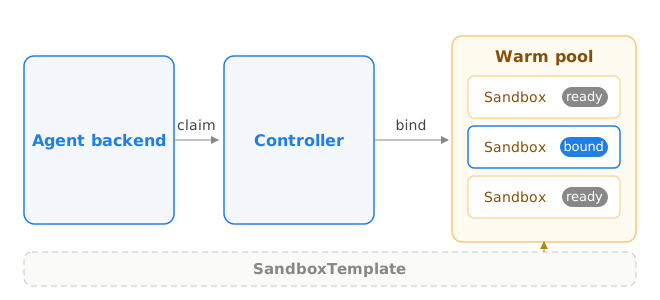
Agent Sandbox installs a controller and a set of custom resources. You define what a sandbox looks like once, optionally keep a pool of them pre-warmed, and then claim one whenever an agent needs to run code.
| Resource | Purpose |
|---|---|
SandboxTemplate | The blueprint for a sandbox: the Pod spec, image, resource limits, security context, and runtime class. Define it once and reuse it. |
SandboxWarmPool | A pool of pre-created, ready-to-serve sandboxes based on a template. The controller serves requests from the pool instead of scheduling a new Pod. Acquisition takes roughly one second, instead of the multiple seconds that cold Pod scheduling and an image pull would take. |
SandboxClaim | A request for a sandbox. The controller binds the claim to a warm sandbox (or creates one) and reports it as ready. Your application creates a claim, uses the bound sandbox, and deletes the claim to release it. |
Sandbox | The running sandbox instance itself, backed by a Pod. Its status exposes the Pod details your client connects to. |
The result is a warm-pool acquisition model: agents get a fresh, isolated environment on demand, and you control exactly what runs inside it.
Install the controller
Agent Sandbox is distributed as a Helm chart. Install it into a dedicated namespace on your CFKE cluster. The controller ships CRDs and an extensions API (extensions.agents.x-k8s.io) that provides SandboxTemplate, SandboxWarmPool, and SandboxClaim.
# Clone the project at a pinned release.
git clone --depth 1 --branch v0.5.0 \
  https://github.com/kubernetes-sigs/agent-sandbox.git
cd agent-sandbox

# Install the controller and enable the extensions (templates, warm pools, claims).
helm upgrade --install agent-sandbox ./helm \
  --namespace agent-sandbox-system --create-namespace \
  --set controller.extensions=true \
  --wait

# Confirm the CRDs are installed.
kubectl get crd | grep 'agents.x-k8s.io'Note: Pin the release tag (
v0.5.0above) rather than trackingmain, and setresources.requestsand anodeSelectoron the controller through Helm values so CFKE node auto-provisioning schedules it predictably. Mirror the controller image into your Cloudfleet Container Registry to avoid depending on an upstream registry at deploy time.
Build a sandbox runtime image
The sandbox image is the service your agents talk to: a process that listens for code, executes it, and returns the result. Production runtimes typically wrap a persistent Python kernel and return rich output such as tables and charts, but a minimal runtime fits in two files.
Create a server.py that executes submitted Python code and keeps state between calls, so an agent can build on earlier results within a session:
import contextlib
import io

from fastapi import FastAPI
from pydantic import BaseModel

app = FastAPI()
session = {}  # persistent globals: state survives across /execute calls


class ExecuteRequest(BaseModel):
    code: str


@app.get("/healthz")
@app.get("/readyz")
def health():
    return {"status": "ok"}


@app.post("/execute")
def execute(request: ExecuteRequest):
    stdout = io.StringIO()
    try:
        with contextlib.redirect_stdout(stdout):
            exec(request.code, session)
        return {"output": stdout.getvalue(), "error": None}
    except Exception as exc:
        return {"output": stdout.getvalue(), "error": repr(exc)}
Add a Dockerfile next to it. It runs as a non-root user and works with the read-only root filesystem the sandbox template enforces:
FROM python:3.13-slim

RUN pip install --no-cache-dir fastapi uvicorn pandas numpy matplotlib

# Match the runAsUser/runAsGroup in the sandbox template.
RUN groupadd --gid 65532 sandbox \
    && useradd --uid 65532 --gid 65532 --no-create-home sandbox \
    && mkdir -p /mnt/data && chown 65532:65532 /mnt/data

COPY server.py /opt/runtime/server.py

USER 65532:65532
WORKDIR /mnt/data
EXPOSE 8888
CMD ["uvicorn", "server:app", "--app-dir", "/opt/runtime", "--host", "0.0.0.0", "--port", "8888"]
Build the image and push it to the Cloudfleet Container Registry, which your cluster can pull from without extra credentials. The Cloudfleet CLI configures Docker authentication for you:
# One-time: wire Docker up to authenticate against CFCR.
cloudfleet auth configure-docker

# Build and push. Replace YOUR_ORG_ID with your organization ID.
docker build -t YOUR_ORG_ID.europe.registry.cloudfleet.dev/sandbox-runtime:v1 .
docker push YOUR_ORG_ID.europe.registry.cloudfleet.dev/sandbox-runtime:v1
Define a sandbox template
The template is where you make sandboxes secure by default. The example below runs as a non-root user with a read-only root filesystem, drops all Linux capabilities, disables the service account token, and applies the RuntimeDefault seccomp profile. Adding runtimeClassName: kata puts every sandbox inside its own micro VM.
apiVersion: extensions.agents.x-k8s.io/v1beta1
kind: SandboxTemplate
metadata:
  name: python-sandbox
  namespace: sandboxes
spec:
  service: true
  podTemplate:
    spec:
      # VM-level isolation for untrusted code. Requires Kata-enabled nodes.
      # See the Kata Containers guide. Remove this line to run on the
      # standard container runtime instead.
      runtimeClassName: kata
      automountServiceAccountToken: false
      enableServiceLinks: false
      securityContext:
        runAsNonRoot: true
        runAsUser: 65532
        runAsGroup: 65532
        seccompProfile:
          type: RuntimeDefault
      containers:
        - name: sandbox
          image: YOUR_ORG_ID.europe.registry.cloudfleet.dev/sandbox-runtime:v1
          ports:
            - name: http
              containerPort: 8888
          readinessProbe:
            httpGet:
              path: /readyz
              port: http
          resources:
            requests:
              cpu: 250m
              memory: 512Mi
            limits:
              cpu: "1"
              memory: 1536Mi
          securityContext:
            allowPrivilegeEscalation: false
            readOnlyRootFilesystem: true
            capabilities:
              drop: ["ALL"]
          volumeMounts:
            - name: data
              mountPath: /mnt/data
            - name: tmp
              mountPath: /tmp
      volumes:
        - name: data
          emptyDir:
            sizeLimit: 512Mi
        - name: tmp
          emptyDir:
            sizeLimit: 256Mi
The template references the runtime image you pushed to CFCR in the previous step. As your runtime evolves, push a new tag and update the template; the warm pool’s update strategy replaces pooled sandboxes with the new version.
Keep a warm pool
A warm pool pre-creates sandboxes, so an agent never waits for a cold Pod. Size it to your expected concurrency.
apiVersion: extensions.agents.x-k8s.io/v1beta1
kind: SandboxWarmPool
metadata:
  name: python-sandbox
  namespace: sandboxes
spec:
  replicas: 30
  sandboxTemplateRef:
    name: python-sandbox
  updateStrategy:
    type: Recreate
With 30 replicas, up to 30 sandboxes are ready to be claimed at any moment, and the controller refills the pool as sandboxes are taken. Combined with CFKE node auto-provisioning, the underlying nodes scale to hold the pool and release when demand drops.
Claim and use a sandbox
Your agent backend requests a sandbox by creating a SandboxClaim. The controller binds it to a warm sandbox and marks it ready. Your application then connects to the sandbox Pod (in-cluster, over the Pod network) and streams code to it. When the work is done, delete the claim to return the sandbox.
apiVersion: extensions.agents.x-k8s.io/v1beta1
kind: SandboxClaim
metadata:
  generateName: sandbox-claim-
  namespace: sandboxes
spec:
  sandboxTemplateRef:
name: python-sandbox# Watch claims get bound to a ready sandbox.
kubectl -n sandboxes get sandboxclaims
# NAME READY SANDBOX REASON
# sandbox-claim-00abb2f9 True python-sandbox-7f DependenciesReadyTo try the runtime you built, port-forward to the bound sandbox and send it some code. State persists between calls, which is exactly what an agent needs to work iteratively:
kubectl -n sandboxes port-forward pod/python-sandbox-7f 8888:8888 &

curl -s localhost:8888/execute -H 'Content-Type: application/json' \
  -d '{"code": "import pandas as pd\ndf = pd.DataFrame({\"revenue\": [120, 150, 180]})\nprint(df.sum())"}'
# {"output":"revenue    450\ndtype: int64\n","error":null}

# The session keeps its state: df is still defined in the next call.
curl -s localhost:8888/execute -H 'Content-Type: application/json' \
  -d '{"code": "print(df.mean())"}'
# {"output":"revenue    150.0\ndtype: float64\n","error":null}
Port-forwarding is for trying things out. In production, your agent backend claims and connects to sandboxes through the project’s client SDKs instead.
Use the Python SDK
The Python client, published on PyPI as k8s-agent-sandbox, wraps the whole create-poll-connect-release flow, so your agent code never deals with the Kubernetes API directly. When your backend runs in the same cluster as its sandboxes, SandboxInClusterConnectionConfig is the natural connection mode. The client resolves each sandbox’s Pod IP and connects directly over the cluster network, with no gateway or port-forwarding in between.
from k8s_agent_sandbox import SandboxClient
from k8s_agent_sandbox.models import SandboxInClusterConnectionConfig

client = SandboxClient(
    connection_config=SandboxInClusterConnectionConfig(server_port=8888),
)

# Takes a pre-warmed sandbox from the pool and waits until it is ready.
sandbox = client.create_sandbox(warmpool="python-sandbox", namespace="sandboxes")
try:
    ...  # talk to your runtime over the connection, e.g. POST /execute
finally:
    sandbox.terminate()  # release the sandbox
The client also ships an async variant (AsyncSandboxClient), connection modes for backends running outside the cluster, and higher-level helpers such as sandbox.commands.run() for images that implement the project’s own runtime API. For the full API, refer to the Python client documentation.
Give the backend’s service account only the RBAC it needs: create, get, watch, and delete on sandboxclaims, and read access to sandboxes.
Lock down the network
Sandboxes run untrusted code, so treat the network as hostile by default. Apply a default-deny NetworkPolicy in the sandbox namespace. Then allow only what the sandbox genuinely needs, typically cluster DNS and the specific in-cluster service your agent backend exposes. Everything else stays blocked, including the public internet, cloud metadata endpoints, the Kubernetes API server, and other Pods.
apiVersion: networking.k8s.io/v1
kind: NetworkPolicy
metadata:
  name: sandbox-default-deny
  namespace: sandboxes
spec:
  podSelector: {}
  policyTypes:
    - Ingress
    - Egress
Add narrow allow rules on top of this for DNS resolution to CoreDNS and for the exact backend endpoints your sandboxes must reach. A NetworkPolicy cannot distinguish your runtime’s own traffic from user code that shares the same Pod. For this reason, any service a sandbox is allowed to reach must authenticate requests that come from sandbox origins.
Defense in depth
Running Agent Sandbox on CFKE with the full stack gives you layered isolation. Kata Containers put each sandbox in its own micro VM with a dedicated guest kernel. Inside it, a hardened Pod security context runs code as non-root, with a read-only root filesystem, no capabilities, no service account token, and seccomp enforced. Around it, a default-deny NetworkPolicy blocks all traffic except an explicit allow-list, and a dedicated node pool keeps untrusted sandboxes off the nodes running your trusted platform services.
Together, these layers give you a self-hosted, multi-cloud alternative to hosted agent sandbox services, with the security boundaries under your control. To scale your sandboxes elastically across cloud, hybrid, or on-premises capacity, combine Agent Sandbox with node auto-provisioning and Fleets.
← Kata Containers