Kata Containers
Kata Containers give your Pods the workload isolation and security of virtual machines, and stay as light and fast as containers. Each sandboxed Pod runs inside its own lightweight VM with a dedicated guest kernel. Even a full container escape stops at a hardware virtualization boundary instead of reaching the node and every other workload on it.
On Cloudfleet Kubernetes Engine (CFKE), Kata is available as a managed runtime. After enablement on your cluster, a single field schedules a Pod into a VM sandbox: runtimeClassName: kata. Your images, manifests, and tooling need no changes.
Why sandbox your workloads
Standard containers share the host Linux kernel. Namespaces and cgroups provide logical separation, but the kernel itself is a single shared attack surface. A flaw in the container runtime or in the host kernel can let a process inside a container escape. The process can then affect the node, the workloads running on it, and the credentials those workloads hold.
That risk is acceptable when you built and trust everything on the node. It stops being acceptable as soon as the node runs code you do not control. The clearest example today is AI agents: large language models write and execute code that nobody reviewed, so that code is untrusted by definition. The same applies to multi-tenant platforms, where a tenant that escapes their container could read or exfiltrate another tenant’s data. It also applies to third-party plugins, customer-submitted jobs, and CI/CD runners that build pull requests from external contributors. Even a well-intentioned application becomes a risk when it parses untrusted media or documents, because a memory-corruption bug in a parser can give an attacker the same foothold.
Kata Containers add a second layer of defense between these workloads and your infrastructure. A workload can compromise its own container, and even its own guest kernel, and still faces the hardware virtualization boundary before it can touch the host.
How Kata Containers work
Kata replaces the isolation model, not the container model. Pods keep behaving like Pods, and the sandbox operates underneath them.
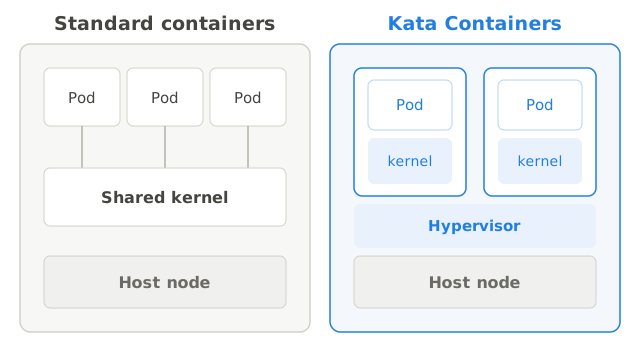
When a Pod requests the Kata runtime, CFKE boots a lightweight VM only for that Pod. Its minimal guest kernel and small root filesystem are tuned to start in a fraction of the time a traditional VM needs. All containers of the Pod run inside that one VM and share the Pod’s network namespace and volumes exactly as Kubernetes defines. Nothing is shared with other Pods except the hypervisor interface. The guest kernel inside the VM serves every system call your workload makes, not the node’s kernel. In effect, the Pod boundary becomes a VM boundary.
Kubernetes does not need to know a VM is involved. You use standard OCI images from any registry, including the Cloudfleet Container Registry. Volumes such as emptyDir, configMap, secret, and CSI-backed storage are shared into the VM transparently. The Pod joins the cluster network like any other Pod, so Services, DNS, and NetworkPolicies apply normally. Liveness and readiness probes, kubectl logs, kubectl exec, and CPU and memory limits all behave the way they do for any other workload.
CFKE runs Kata with Cloud Hypervisor, a modern, minimal virtual machine monitor written in Rust and built specifically for cloud workloads. It has a small trusted computing base, boots fast, keeps per-VM memory overhead low, and implements only the device model that server workloads need. Compared to a general-purpose hypervisor, it keeps sandbox density high and startup latency low. This matters when you run many short-lived sandboxes rather than a few long-lived VMs.
Node requirements
Kata needs hardware virtualization on the node. Bare-metal machines provide it directly, including self-managed nodes on your own hardware and bare-metal cloud instances. Regular virtualized cloud instances work only if the instance type supports nested virtualization, which means it can run VMs inside the VM. Standard instances without it cannot run Kata. When you request enablement, Cloudfleet support confirms which instance types in your target Fleets are Kata-capable.
Enabling Kata on your cluster
Kata enablement is fully managed by Cloudfleet. To turn it on, contact Cloudfleet support and describe which nodes or Fleet should run sandboxed workloads. Cloudfleet handles the complete setup end to end. It installs and configures the Kata runtime with Cloud Hypervisor on the target nodes and tunes the hosts for dense sandbox workloads. It creates the kata RuntimeClass in your cluster and prepares the cluster network so services and DNS work from inside the sandboxes. It also verifies every node before it accepts sandboxed workloads.
After support confirms enablement, your only responsibility is to set runtimeClassName: kata on the workloads you want sandboxed. The runtime class handles everything else, including node placement.
Running a workload with Kata
Add runtimeClassName: kata to a Pod spec. The scheduler places the Pod on a Kata-enabled node, and the Pod boots inside its own VM. Everything else in the manifest stays the same.
apiVersion: v1
kind: Pod
metadata:
  name: kata-demo
spec:
  runtimeClassName: kata
  containers:
    - name: app
      image: python:3.13-slim
      command: ["sleep", "3600"]
The RuntimeClass carries a node selector for the Kata-enabled nodes, so Pods that request it are automatically constrained to capable nodes. You do not need to add your own nodeSelector for placement.
Verify the isolation
A Pod running under Kata sees its own guest kernel, not the node’s kernel. Confirm the runtime class and compare kernel identities:
kubectl get pod kata-demo -o jsonpath='{.spec.runtimeClassName}{"\n"}'
# kata

# The guest kernel version differs from the node's kernel, confirming
# the workload runs inside its own VM.
kubectl exec kata-demo -- uname -r
Use it in a Deployment
runtimeClassName is a Pod template field, so it works the same way in Deployments, Jobs, StatefulSets, or any controller:
apiVersion: apps/v1
kind: Deployment
metadata:
  name: untrusted-worker
spec:
  replicas: 3
  selector:
    matchLabels:
      app: untrusted-worker
  template:
    metadata:
      labels:
        app: untrusted-worker
    spec:
      runtimeClassName: kata
      automountServiceAccountToken: false
      securityContext:
        runAsNonRoot: true
        seccompProfile:
          type: RuntimeDefault
      containers:
        - name: worker
          image: your-registry/untrusted-worker:latest
          resources:
            requests:
              cpu: 250m
              memory: 512Mi
            limits:
              cpu: "1"
              memory: 1Gi
          securityContext:
            allowPrivilegeEscalation: false
            readOnlyRootFilesystem: true
            capabilities:
              drop: ["ALL"]
Recommended use cases
Kata Containers are an especially good fit for services that accept and run untrusted user code, such as AI agent and code-interpreter backends. Agent Sandbox builds a complete pattern on top of Kata. They are equally at home on multi-tenant platforms where tenant workloads must not share a kernel, and in CI/CD pipelines that build and test repositories that accept external contributions. They also suit third-party or unaudited applications and workloads that process untrusted external media or data.
Trusted first-party services generally do not need Kata. Apply it selectively to the workloads whose compromise you are defending against, and keep the rest of the cluster on the standard runtime.
Limitations and considerations
Kata trades a small amount of overhead and compatibility for a much stronger isolation boundary. Each sandboxed Pod carries a guest kernel and a hypervisor process. Memory overhead per Pod is therefore higher than with the standard runtime, and Pod density per node is correspondingly lower. Workloads that make a large volume of I/O system calls cross the virtualization boundary more often. They may need more resources than they would in a standard container, so benchmark performance-critical workloads before committing. On cloud instances with nested virtualization, expect somewhat lower I/O and CPU performance than on bare metal. For dense or latency-sensitive sandbox deployments, bare-metal nodes are the better foundation.
Always set CPU and memory limits on sandboxed containers. Limits protect the node against a defective or malicious workload trying to starve it of resources, and they give the VM a correctly sized footprint.
Features that reach through to the host conflict with the sandbox model. hostPath volumes, privileged containers, and direct device access are not available inside Kata Pods, and a workload that needs them does not belong in a sandbox. GPUs are not supported inside Kata Pods. For GPU scheduling on the standard runtime, see GPU-based workloads.
Defense in depth
Kata isolates the kernel attack surface, but it does not replace the rest of your security posture. Anything a sandboxed workload is allowed to reach lives outside the sandbox boundary and must be protected on its own.
Start with a hardened Pod security context, as in the Deployment example above. Run as non-root, drop all capabilities, use a read-only root filesystem, and disable privilege escalation. Keep the RuntimeDefault seccomp profile, and set automountServiceAccountToken: false so untrusted code holds no Kubernetes credentials. Then lock down the network with default-deny NetworkPolicies that allow only the specific endpoints the workload needs, and block access to cloud metadata endpoints (169.254.169.254) so escaped code cannot harvest instance credentials.
Network reachability from a sandbox should never imply trust: any API a sandboxed workload can reach must authenticate its callers. Finally, run untrusted workloads on a dedicated Kata node pool, separate from the nodes hosting your trusted platform services, so even resource exhaustion stays contained.
Frequently asked questions
Q: Do I need Kata to run Agent Sandbox?
No. Agent Sandbox works on the standard container runtime. Kata is the recommended addition when the sandboxes execute untrusted code and you want a VM boundary around each one.
Q: Do I need to change my container images?
No. Kata runs standard OCI images from any registry. The only change to your manifests is runtimeClassName: kata.
Q: Do kubectl logs, kubectl exec, and probes still work?
Yes. Kata is transparent to Kubernetes tooling. Logs, exec, port-forward, liveness and readiness probes, and resource limits behave as they do for any other Pod.
Q: Can I use GPUs inside Kata Pods?
No. GPU workloads are not supported under Kata. Run them on the standard runtime as described in GPU-based workloads.
Q: How much overhead does Kata add?
Each Pod carries a small guest kernel and a Cloud Hypervisor process. For typical code-execution and service workloads, the difference is modest. Benchmark I/O-heavy workloads. Plan for somewhat lower Pod density per node than with the standard runtime.
Q: How do I get Kata enabled?
Contact Cloudfleet support. Enablement is fully managed, including node setup, the RuntimeClass, and network configuration. Your part afterward is a single line in the Pod spec.
Next steps
Kata gives you the isolation boundary. To manage large numbers of short-lived sandboxes on top of it, with pre-warmed Pods and near-instant acquisition, see Agent Sandbox. Kata is not required to run Agent Sandbox, but it is the recommended runtime when the sandboxes execute untrusted code.
Agent Sandbox →