Private container registry hosted in Europe

Fully managed, OCI-compliant container registry with EU data residency and no egress fees from your Kubernetes clusters. Store and distribute container images, Helm charts, and OCI artifacts from a registry built for Kubernetes.

/images/stack/cloudfleet-container-registry.svg
CFCR - Cloudfleet Container Registry

Your container images stored in the EU

Cloudfleet Container Registry (CFCR) is a fully managed OCI-compliant registry available in three regions: Europe, North America, and Asia Pacific. The Europe region stores your data on EU infrastructure, helping you meet data residency requirements under GDPR, NIS2, and sector-specific regulations.

You get a private registry with unlimited repositories, no pull rate limits, and no egress fees when pulling from Cloudfleet Kubernetes Engine clusters.

CFCR works with standard Docker tooling, standard OCI APIs, and any CI/CD platform. If you are currently using Docker Hub or GHCR, switching takes minutes: re-tag your images, push, and update your deployment manifests.

EU data residency by default

The Europe region stores your container images, Helm charts, and OCI artifacts on EU infrastructure, supporting GDPR and other data residency requirements. Choose Europe, North America, or Asia Pacific based on where your workloads run or where your regulations require.

Zero-config Kubernetes integration

CFKE clusters authenticate to CFCR automatically using short-lived OIDC tokens. No image pull secrets to create, no service accounts to configure, no credentials to rotate. This eliminates an entire class of deployment failures caused by expired tokens or misconfigured secrets. If you use Cloudfleet Kubernetes Engine, images just pull.

More than container images

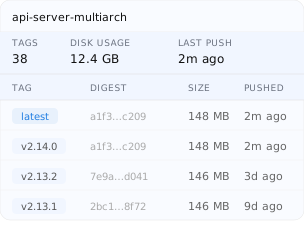
CFCR stores any OCI-compliant artifact. Push Docker images, multi-architecture images built with Docker Buildx, Helm charts as OCI artifacts, software bills of materials (SBOMs), image signatures, and configuration bundles. Manage your entire software supply chain from a single registry using standard tools you already know.

Drop-in replacement for Docker Hub and GHCR

Already using Docker Hub or GitHub Container Registry? CFCR uses standard Docker authentication and OCI APIs. Re-tag your images, update your CI/CD secrets, and push. No vendor-specific CLI, no proprietary plugins, no migration tools required. Your Dockerfiles, build scripts, and GitHub Actions workflows work without changes.

Kubernetes manifest example

Push a container image

Build, tag, and push a container image to your Cloudfleet Container Registry in three commands. The Cloudfleet CLI acts as a Docker credential helper, so authentication is seamless.

Kubernetes manifest example

Deploy to CFKE

Deploy images from CFCR to your Cloudfleet Kubernetes Engine cluster with zero authentication configuration. No imagePullSecrets needed.

Kubernetes manifest example

Push a Helm chart

Store Helm charts as OCI artifacts alongside your container images. Helm 3.8+ supports OCI registries natively.

Kubernetes manifest example

GitHub Actions CI/CD

Automate image builds and pushes from GitHub Actions with built-in Docker layer caching and automatic metadata tagging.

# Build your image
docker build -t myapp:v1.0.0 .

# Tag for your registry
docker tag myapp:v1.0.0 \
  YOUR_ORG_ID.europe.registry.cloudfleet.dev/myapp:v1.0.0


# Push the image
docker push \
  YOUR_ORG_ID.europe.registry.cloudfleet.dev/myapp:v1.0.0
apiVersion: apps/v1
kind: Deployment
metadata:
  name: myapp
spec:
  replicas: 3
  selector:
    matchLabels:
      app: myapp
  template:
    metadata:
      labels:
        app: myapp
    spec:
      containers:
      - name: myapp
        image: YOUR_ORG_ID.europe.registry.cloudfleet.dev/myapp:v1.0.0
        ports:
        - containerPort: 8080
# Package your chart
helm package ./my-chart

# Push to your registry
helm push my-chart-1.0.0.tgz \
  oci://YOUR_ORG_ID.europe.registry.cloudfleet.dev/charts


# Install directly from the registry
helm install my-release \
  oci://YOUR_ORG_ID.europe.registry.cloudfleet.dev/charts/my-chart \
  --version 1.0.0
name: Build and Push
on:
  push:
    branches: [main]

env:
  REGISTRY: ${{ secrets.CF_ORG_ID }}.${{ secrets.CFCR_REGION }}.registry.cloudfleet.dev
  IMAGE_NAME: myapp

jobs:
  build-and-push:
    runs-on: ubuntu-latest
    steps:
      - uses: actions/checkout@v4

      - uses: docker/setup-buildx-action@v3

      - uses: docker/login-action@v3
        with:
          registry: ${{ env.REGISTRY }}
          username: ${{ secrets.CF_TOKEN_ID }}
          password: ${{ secrets.CF_TOKEN_SECRET }}

      - uses: docker/build-push-action@v5
        with:
          context: .
          push: true
          tags: ${{ env.REGISTRY }}/${{ env.IMAGE_NAME }}:${{ github.sha }}
          cache-from: type=gha
          cache-to: type=gha,mode=max
Kubernetes manifest example

Push a container image

Build, tag, and push a container image to your Cloudfleet Container Registry in three commands. The Cloudfleet CLI acts as a Docker credential helper, so authentication is seamless.

Kubernetes manifest example

Deploy to CFKE

Deploy images from CFCR to your Cloudfleet Kubernetes Engine cluster with zero authentication configuration. No imagePullSecrets needed.

Kubernetes manifest example

Push a Helm chart

Store Helm charts as OCI artifacts alongside your container images. Helm 3.8+ supports OCI registries natively.

Kubernetes manifest example

GitHub Actions CI/CD

Automate image builds and pushes from GitHub Actions with built-in Docker layer caching and automatic metadata tagging.

Everything you need from a container registry

CFCR provides a complete set of registry capabilities designed to work seamlessly with your development workflow, whether you use Cloudfleet Kubernetes Engine or any other Kubernetes distribution.

OCI-compliant registry

Fully compliant with Open Container Initiative specifications. Store Docker images, multi-architecture manifest lists, Helm charts, and any OCI artifact using standard tools and APIs.

No pull rate limits

Unlike Docker Hub’s 100-pull limit per 6 hours, CFCR has no pull rate limits for authenticated users or CFKE clusters. Your CI/CD pipelines and production clusters pull without throttling.

No egress fees from CFKE

Pulling images from CFCR to Cloudfleet Kubernetes Engine clusters incurs no data transfer charges. Keep your images close to your clusters without surprise bandwidth bills.

Multi-architecture images

Build and push images for AMD64, ARM64, and other architectures using Docker Buildx. CFCR stores manifest lists so the correct image is pulled automatically for each platform.

Helm chart registry

Store and distribute Helm charts as OCI artifacts. Push, pull, and install charts directly from your registry using Helm 3.8+ with native OCI support.

Docker credential helper

The Cloudfleet CLI integrates with Docker as a credential helper, providing seamless authentication with short-lived tokens. No long-lived credentials stored on disk.

FAQ

Container registry FAQ

Cloudfleet Container Registry (CFCR) is a fully managed, OCI-compliant container registry. It stores Docker images, multi-architecture images, Helm charts, and OCI artifacts. Available in Europe, North America, and Asia Pacific, with the Europe region storing data on EU infrastructure.

No. CFCR works with any Kubernetes distribution, any CI/CD platform, and any Docker-compatible tool. You authenticate using standard Docker credentials (API tokens as username/password). CFKE users get the additional benefit of automatic zero-config authentication, but CFCR is a standalone registry product.

CFCR is included with every Cloudfleet organization. You can create a free Cloudfleet account and start pushing images immediately. See the pricing page for storage tiers and details.

Re-tag your existing images with your CFCR registry URL and push them. For example: docker tag myapp:v1 YOUR_ORG_ID.europe.registry.cloudfleet.dev/myapp:v1 && docker push YOUR_ORG_ID.europe.registry.cloudfleet.dev/myapp:v1. Update your CI/CD secrets and deployment manifests to reference the new registry. No special migration tools are needed since CFCR uses standard Docker and OCI APIs.

Harbor is a solid open-source option, but running it in production requires managing high availability, storage backends, garbage collection, TLS certificates, vulnerability scanner integration, and upgrades. CFCR is fully managed with no operational overhead, includes multi-region availability, and integrates directly with Cloudfleet Kubernetes Engine for zero-config image pulls.

CFCR is available in three regions - Europe, North America, and Asia Pacific. Each region uses the format YOUR_ORG_ID.REGION.registry.cloudfleet.dev where REGION is europe, northamerica, or apac. The Europe region stores data on EU infrastructure.

No. CFKE clusters authenticate to CFCR automatically using short-lived OIDC tokens. You simply reference your CFCR image URL in your pod specifications and the image pulls successfully. No imagePullSecrets, service accounts, or credential management required.

CFCR works with any CI/CD platform that supports Docker authentication. Detailed configuration examples are available for GitHub Actions, GitLab CI, Jenkins, CircleCI, and Azure DevOps. You authenticate using API tokens as standard Docker username and password credentials.

Yes. CFCR supports Helm charts stored as OCI artifacts. Helm 3.8 and later can push, pull, and install charts directly from CFCR using oci:// URLs. This allows you to manage both container images and Helm charts in a single registry.

CFCR uses role-based access control. Administrators can push and pull images. Users have pull-only access. API tokens inherit the role assigned at creation. CFKE clusters have implicit pull-only access. Each organization has a completely isolated registry namespace with separate authentication, authorization, and storage.
Feature comparison

CFCR vs Docker Hub, GHCR, Quay.io, and Harbor

Most teams default to Docker Hub or GitHub Container Registry without considering the trade-offs. Here is how Cloudfleet Container Registry compares on the dimensions that matter most: data residency, operational overhead, and cost predictability.
Features/images/comparison/docker-hub.png/images/comparison/ghcr.png/images/comparison/quay.png/images/logo_text_transparent.png

EU data residency

Whether container images can be stored in the EU.

No EU region option. Images are stored on US infrastructure.

No EU region option. Images are stored on US infrastructure.

No EU region option for the hosted service. Self-hosted Quay can run in the EU but requires you to operate it.

Europe region stores images on EU infrastructure.

Pull rate limits

Restrictions on the number of image pulls in a given time period.

Unauthenticated: 100 pulls per 6 hours. Free authenticated: 200 pulls per 6 hours. Paid plans required for more.

Rate limits apply based on GitHub Actions usage and account type.

No documented public rate limits, but quotas may apply.

No pull rate limits for authenticated users or CFKE clusters.

Egress fees from Kubernetes

Data transfer costs when pulling images from the registry into your Kubernetes clusters.

Standard internet egress rates apply. No special pricing for Kubernetes clusters.

Standard internet egress rates apply. No special pricing for Kubernetes clusters.

Standard internet egress rates apply. No special pricing for Kubernetes clusters.

No egress fees when pulling from CFKE clusters. Images stay close to your workloads.

Kubernetes integration

How the registry authenticates with Kubernetes clusters.

Requires image pull secrets in every namespace. Manual token rotation.

Requires image pull secrets with a personal access token. No native Kubernetes integration.

Requires image pull secrets with robot account credentials.

CFKE clusters authenticate automatically. No image pull secrets, no service accounts, no credential rotation.

Private repositories

Availability of private image repositories.

Free plan: 1 private repo. Paid plans start at $7/month.

Free for public repos. Private repos have limited storage and bandwidth.

Free tier limited. Paid plans start at $15/month.

Unlimited private repositories included with every Cloudfleet organization.

Self-hosting required

Whether you need to operate your own infrastructure to get the feature set.

Fully managed SaaS.

Fully managed SaaS.

Hosted SaaS available, but EU residency requires self-hosting Quay with your own HA setup, storage, and upgrades.

Fully managed SaaS with EU residency built in. No infrastructure to operate.

Helm chart support

Ability to store and distribute Helm charts as OCI artifacts.

Supported.

Supported.

Supported.

Supported. Push, pull, and install directly with Helm 3.8+.

Learn more about Cloudfleet Container Registry

Documentation

Integration

Related

Security built-in.

Access control & governance

Fine-grained role-based access control (RBAC) with organization and project scopes, least-privilege permissions, and comprehensive audit trails for all user actions.

User
User
Kubernetes
User
User

Identity federation

Enterprise Single Sign-On (SSO) via SAML and OIDC, integrating with Okta, Microsoft Entra ID, Google Workspace, and other compatible identity providers.

Cloudfleet Microsoft Entra integration
Cloudfleet Okta integration
Cloudfleet Google Workspaces integration

Enterprise-grade security

Governance, centralized audit logging, and compliance readiness aligned with SOC 2 and ISO 27001 standards (certifications in progress).

Cloudfleet GDPR badge
GDPR
COMPLIANT
Cloudfleet CCPA badge
CCPA
COMPLIANT

Enterprise support you deserve.

Built to support large-scale, mission-critical deployments with dedicated teams, proven processes, and clear operational commitments.

Professional services

Expert-led architecture, deployment, and migration services to help you design, roll out, and scale Cloudfleet across complex environments.

Customer success team

A dedicated customer success team guiding onboarding, adoption, and long-term success, with access to best practices and operational guidance.

Technical account support

24/7 access to experienced engineers via defined support channels, with clear escalation paths for critical incidents.

Service Level Agreements

Clearly defined Service Level Agreements (SLAs) covering availability, response times, and incident handling for mission-critical workloads.

Cloudfleet seamlessly extends your cluster anywhere, turning any hardware - even in your office or home - into a modern enterprise cluster.

Jules Huls, Information Security Expert
Jules Huls
Information Security Expert

Using Cloudfleet together with Hetzner allowed us to bring up a managed Kubernetes cluster just as quick as with any US-based hyper-scaler, but with the benefit of being EU hosted which is very valuable in today's times.

Martin Schulze, CEO & Founder
Martin Schulze
CEO & Founder

By combining our standardized configurations with the powerful automation features of the Cloudfleet platform, we've built a development workflow that is fast, secure, and incredibly efficient.

Onur Solmaz, VP of Engineering and Research
Onur Solmaz
VP of Engineering and Research

Perfect balance between flexibility and managed service - and the support is outstanding.

Daniel Costa, Sales Engineer
Daniel Costa
Sales Engineer

We deploy to customer infrastructure without changing how we build or manage Kubernetes.

Julian Becker, Principal DevOps Engineer
Julian Becker
Principal DevOps Engineer

It is easy to build a multi-cloud setup without getting locked into any single provider.

Carlos Mendes, Infrastructure Architect
Carlos Mendes
Infrastructure Architect

It is easy to build a multi-cloud setup without vendor lock-in.

Luca Meyer, Principal DevOps Engineer
Luca Meyer
Principal DevOps Engineer

Cloudfleet lets us scale our game servers across multiple providers - reliably and affordably.

Max Keller, Senior DevOps Engineer
Max Keller
Senior DevOps Engineer

Cloudfleet not only cut our infrastructure costs - it saved us hours of work by taking cluster management off our plate.

Richard Callahan, Engineering Manager
Richard Callahan
Engineering Manager
Why Cloudfleet

Designed for modern cloud operations.

Hybrid-cloud by design

Run Kubernetes consistently across public cloud, private infrastructure, and on-prem environments, with a single control plane and unified operational model.

Operational simplicity

Operate, scale, and migrate Kubernetes clusters across environments using a consistent, opinionated platform that reduces operational overhead.

Predictable costs

Transparent pricing and infrastructure control help you avoid hyperscaler lock-in, hidden fees, and unexpected cost growth as your workloads scale.

No vendor lock-in

Retain full portability of your clusters, workloads, and tooling by running standard Kubernetes without proprietary extensions or forced dependencies.

Production-grade support

Designed for production workloads, with operational tooling, escalation paths, and support processes built to meet enterprise reliability requirements.

Enterprise-ready security

Secure by default, with isolation, encryption, and access controls designed to meet the requirements of regulated and security-conscious organizations.

Get started with a free Kubernetes cluster

Create your free Cloudfleet Kubernetes cluster in minutes - no setup hassle, no cost. Get started instantly with the always-free Basic plan.